
Rich lesson authoring is the difference between an LMS an instructor tolerates and one they actually want to use. Up to Part 12 a lesson in this series was a title and a single plain-text field — fine to prove the flow, useless for teaching anything real. Part 15 fixes that properly: it gives the instructor workspace a genuine block editor with a widget inserter, models a lesson as an ordered list of sections, lets each section hold headings, lists, tables, code, quotes, images, and embedded video/audio/PDFs/GitHub gists — and then renders all of it to enrolled students as safe, server-sanitized HTML that works without a line of JavaScript.
That last clause is where most of the engineering actually lives. Letting instructors author rich HTML and showing it to other users is a textbook stored-XSS vector, so the heart of this part isn’t the editor — it’s the trust boundary behind it: store the block model, render it on the server, and sanitize it once, hard, before any of it reaches a reader.
It’s tempting to treat authoring as a UI problem — pick a pretty editor, wire it up, done. But the moment authored content is persisted and re-displayed to other people, it becomes a security problem wearing a UI costume. Get the editor right and the sanitization wrong and you’ve shipped a feature that turns every instructor account into a delivery mechanism for attacks on your learners. So this part treats the editor as the easy half and spends its care on the data model and the boundary — which is also why it generalises: any system that lets one user author content shown to another faces exactly this shape of problem, whether it’s an LMS, a CMS, a help desk, or a comment field.
Where Part 15 sits in the series
This extends the working-platform arc (Parts 11–14) into a fifteenth part. Parts 1–10 built the production-grade backend; 11 added login and RBAC; 12–14 built the instructor, student, and admin workspaces. Part 15 goes back into the instructor workspace and makes authoring real, then upgrades the student lesson view to match. It builds directly on Part 12’s lessons and Part 11’s tenant-from-identity security, and it honours Part 3‘s rule about where media bytes belong.

What “a genuine block editor” means
It’s worth being precise, because the term is overloaded. A classic rich-text editor (the kind with a single text area and a toolbar across the top) lets you format inline text. A genuine block editor — the model you know from Notion or WordPress’s Gutenberg — treats a document as a stack of discrete blocks: each block is a paragraph, heading, image, table, code listing, or embed, added from a “+” inserter (the widget panel), reorderable by a drag handle, each with its own settings.
For this stack the right choice is Editor.js — MIT-licensed, framework-agnostic, self-hosted, and a true block editor with that widget inserter. Its one architectural consequence drives the whole design: Editor.js stores its content as JSON blocks, not HTML. We lean into that rather than fight it.
| Classic rich-text (TinyMCE/CKEditor classic, Quill) | Block editor (Editor.js, Gutenberg) | |
|---|---|---|
| Mental model | One text area you format | A stack of typed blocks |
| Adding content | Top toolbar | “+” widget inserter per block |
| Reordering | Cut/paste text | Drag the block handle |
| Output | HTML | Structured JSON |
| Per-element settings | Limited | Each block has its own tune menu |
| Server rendering | Sanitize the HTML | Render JSON → sanitize |
The right-hand column is what an instructor expects from a modern authoring tool, and it’s why we accept the extra step (render JSON to HTML) the block model implies. That step turns out to be a feature, not a tax — it’s exactly where the security boundary lives.
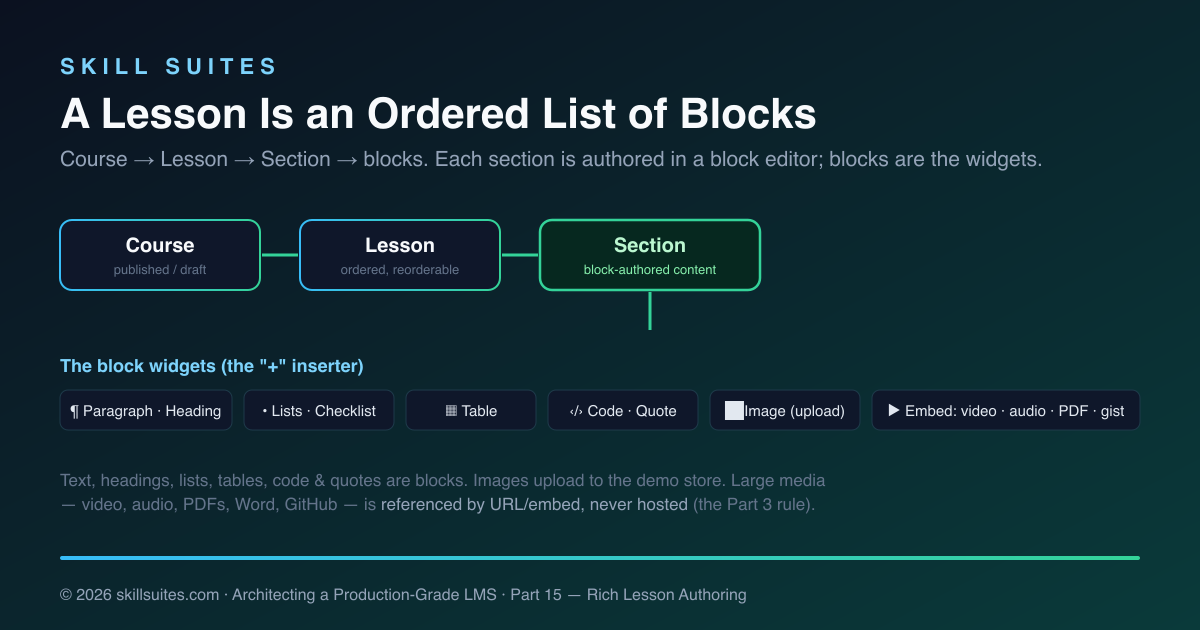
The content model: Course → Lesson → Section → blocks
Part 12 gave us Course → Lesson. Part 15 adds the missing layer: a Lesson is now an ordered list of sections, and a section is the unit of block-authored content. The new Section entity is tenant-scoped (like everything in this series) and stores its content as two things:
@Entity @Table(name = "sections")
public class Section {
    @Id private UUID id;
    @TenantId @Column(name = "tenant_id", ...) private UUID tenantId;
    @Column(name = "course_id", ...) private UUID courseId;   // by id — the series rule
    @Column(name = "lesson_id", ...) private UUID lessonId;
    private String title;
    private int position;
    @Column(length = 500_000) private String contentJson;     // the editor's blocks — editable source of truth
    @Column(length = 500_000) private String renderedHtml;    // sanitized HTML — what learners see
    private Instant updatedAt;
}
The two-field design is the key decision. contentJson is what the editor loads and re-saves — the canonical, structured source. renderedHtml is the server-rendered, sanitized output, computed once on save and served verbatim to students. Storing both means the learner view is a plain HTML dump (no JavaScript, no client rendering, instant and accessible) while the instructor always re-opens the exact block model they authored. The migration (V10__sections.sql) is the tenth in the series and looks like all the others: tenant_id, an index, and PostgreSQL Row-Level Security.
The trust boundary: authored HTML is untrusted input
Here is the part that matters most. The instructor is, from the platform’s point of view, an untrusted source of HTML — not because instructors are malicious, but because a compromised instructor account, a pasted payload, or a malicious raw-HTML block must never be able to run script in a learner’s browser, steal their session, or deface a lesson. So authored content crosses a hard trust boundary exactly once, in one place.
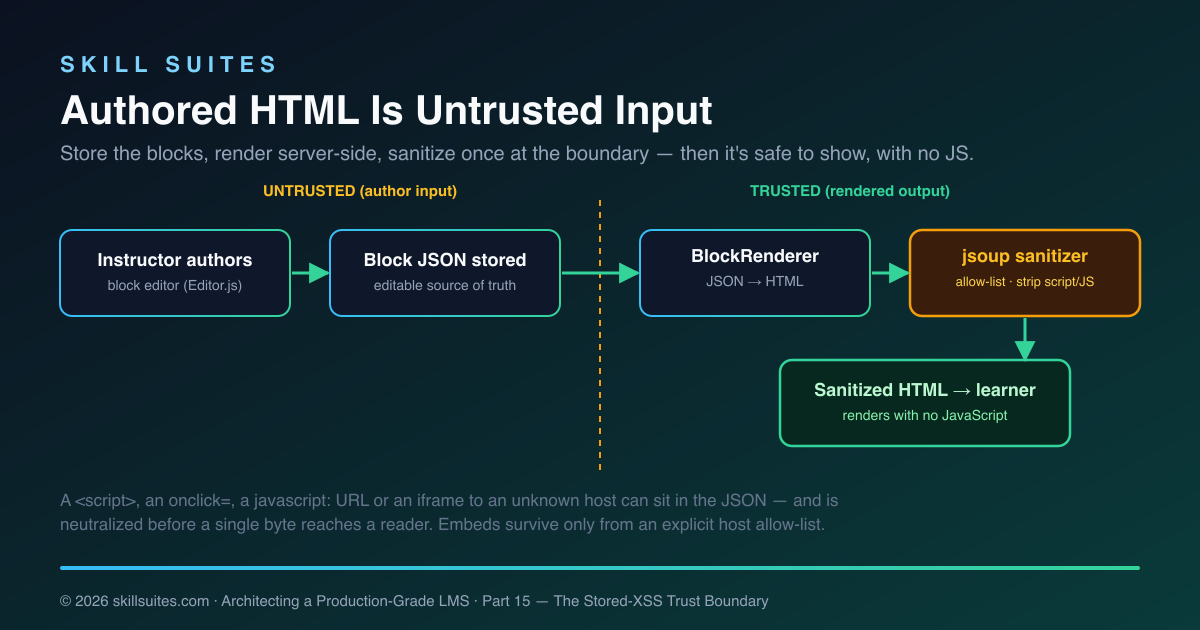
A small BlockRenderer walks the Editor.js JSON and emits a predictable slice of HTML per block type — <h2> for a header, <ul>/<ol> for lists, <table>, <pre><code> (with the code text HTML-escaped so it renders literally and can’t execute), <figure><img>, and <iframe> for embeds. Then everything goes through the sanitizer:
@Component
public class HtmlSanitizer {
    private final Safelist safelist = Safelist.relaxed()
        .addTags("figure", "figcaption", "hr", "mark", "audio", "video", "source", "iframe", "cite")
        .addAttributes("iframe", "src", "width", "height", "allowfullscreen", "frameborder", "loading")
        // ... img/video/audio/code attributes ...
        .addProtocols("a", "href", "http", "https", "mailto")
        .addProtocols("iframe", "src", "https")
        .preserveRelativeLinks(true);   // keep /media/blob/{id}; absolute javascript: URLs still die

    public String sanitize(String html) {
        String cleaned = Jsoup.clean(html, safelist);
        Document doc = Jsoup.parseBodyFragment(cleaned);
        for (Element iframe : doc.select("iframe"))
            if (!hostAllowed(iframe.attr("src"))) iframe.remove();  // embeds only from an allow-list
        return doc.body().html();
    }
}
It’s an allow-list, not a block-list — and that distinction is the whole game. A block-list (“strip <script> and onclick“) fails open: the day a browser ships a new way to execute markup, or an attacker finds an encoding you didn’t anticipate, your filter waves it through. An allow-list fails closed: anything not explicitly named is removed, so an unknown attack vector is denied by default rather than permitted by omission. Only the tags and attributes we listed survive; a <script>, an onclick=, a javascript: URL, or a style expression is stripped because it was never on the list.
Iframes get a second pass: an embed is kept only if its host is on an explicit allow-list (YouTube, Vimeo, SoundCloud, GitHub gist, Google Docs, CodePen, CodeSandbox), so a section can embed a lecture video but not an attacker-controlled frame that could clickjack a learner or load a tracking pixel farm. This is the OWASP discipline from Part 10 applied at a concrete, dangerous surface — and because the allow-lists (tags, attributes, protocols, iframe hosts) are all declared in one small class, the platform’s entire policy on “what authored content may do” is reviewable on a single screen.
The war story: the raw-HTML block that wanted to run
The block editor includes a “raw HTML” widget — instructors asked for it, because sometimes you genuinely need to paste an embed snippet the dedicated tools don’t cover. It’s also the most direct attack surface imaginable: a text box whose contents become page HTML. The naive implementation stores it and renders it with th:utext (unescaped). The first person to type <script>fetch('/api/...').then(...)</script> into a lesson section has just shipped themselves a stored-XSS that fires in every enrolled student’s authenticated browser.
The fix is structural, not a patch: the raw block’s content flows through the same sanitizer as everything else, on the server, before it’s ever stored as renderedHtml. The test pins it down:
@Test void raw_html_block_is_sanitized() {
    String json = "{\"blocks\":[{\"type\":\"raw\",\"data\":{\"html\":\"<b>keep</b><script>evil()</script>\"}}]}";
    String html = renderer.render(json);
    assertThat(html).contains("<b>keep</b>").doesNotContainIgnoringCase("script");
}
Safe formatting survives; the script does not. The lesson here generalises far past an LMS: the trust boundary belongs at the point data crosses from “input” to “rendered,” and it should be one component every path is forced through — not a check sprinkled at call sites, where one forgotten path is a breach.
Anatomy of a save
Tracing one save makes the boundary concrete. When the instructor clicks Save section, the browser serializes the editor and posts plain form fields; the server does the rest:
- Client:
editor.save()resolves to the block JSON; a hidden field is filled and the form posts to/instructor/sections/{id}. No fetch, no API token — a normal form submit, so RBAC and the tenant filter apply unchanged. - Controller: the instructor route (gated to
ROLE_INSTRUCTOR) hands the title and JSON toAuthoringService.saveSection. - Render:
BlockRendererwalks the JSON and emits HTML — escaping code, mapping embeds to iframes, images to figures. - Sanitize: that HTML goes through
HtmlSanitizer— the single trust boundary — producing safe markup. - Persist: the section stores both the original JSON (so the editor can re-open it) and the sanitized HTML (so the learner view can dump it), tenant-stamped by
@TenantId.
The sanitizer runs once per save, not once per read, so the hot path — a student opening a lesson — is a tenant-scoped row fetch and a templated HTML dump, nothing more. The expensive, security-critical work happens at write time, at one chokepoint, which is precisely where you want it.
Wiring the image upload
The block editor’s image widget needs somewhere to send a file. We give it an instructor-only endpoint that stores the bytes and returns the small JSON shape Editor.js expects:
@PostMapping("/instructor/upload/image")
@ResponseBody
public Map<String,Object> uploadImage(@RequestParam("image") MultipartFile image) throws IOException {
    if (image.isEmpty() || !image.getContentType().startsWith("image/")) return Map.of("success", 0);
    UUID id = authoring.storeBlob(image.getContentType(), image.getOriginalFilename(), image.getBytes());
    return Map.of("success", 1, "file", Map.of("url", "/media/blob/" + id));
}
The returned /media/blob/{id} is a relative URL, which is why the sanitizer is configured to preserve relative links — a subtlety worth knowing: jsoup, by default, drops URLs it can’t resolve to an allowed protocol, which would silently strip every uploaded image. Preserving relative links keeps the app’s own URLs while still stripping absolute javascript: URLs (they carry a disallowed scheme). The serving endpoint loads the blob through the tenant-filtered repository, so a user can only ever fetch an image from their own organisation.
Where the bytes live: images vs. everything else
“Add audio, video, images, PDFs, Word documents, GitHub links” is the brief, but those are not all the same problem, and treating them identically is how LMSs end up with a bloated, expensive application tier.
| Artifact | How it’s added | Why |
|---|---|---|
| Text, headings, lists, tables, code, quotes | Native blocks | It’s just content — lives in the section JSON |
| Images | Uploaded to a small demo store | Small, and convenient to upload inline |
| Video, audio | Embedded by URL (YouTube/Vimeo/`<video>`) | Multi-GB bytes must never touch the app server (Part 3) |
| Embedded (iframe) or linked | Reference, don’t re-host | |
| Word docs, GitHub | Links / gist embeds | Reference the canonical source |
Only images upload, and in this demo they land in a tiny tenant-scoped store (a base64 text column, served back from /media/blob/{id} with an authentication and tenant check). That’s deliberately humble — it keeps the demo self-contained with no object storage to stand up. In production this is exactly where Part 3’s pipeline plugs in: the upload goes straight to object storage via a presigned URL and plays back through a signed CDN URL, and the only thing that changes is the upload adapter’s endpoint. Everything bigger than an image is referenced, never hosted — which is both the cheaper and the architecturally correct choice.
The instructor experience
The authoring flow now has three levels, each with its own navigation. The course page lists lessons with a table-of-contents and per-lesson actions — open, reorder (move up/down), delete. Opening a lesson lands on the lesson editor: a TOC of its sections, an “add section” action, rename and reorder controls, and a delete. Opening a section lands in the block editor itself — Editor.js, bound to that section, loaded with its saved blocks.
Inside the editor, the “+” inserter is the widget panel: paragraph, heading, list, checklist, quote, table, code, image (which uploads through our endpoint), and embed (which turns a YouTube/Vimeo/gist URL into a player). Blocks drag to reorder; inline tools handle bold, italic, links, marker, and inline code. Saving serializes the blocks to JSON and posts them; the server renders and sanitizes in the same request.
Reordering lessons and sections is done with explicit move-up/down controls rather than drag-only, so the structure is editable without JavaScript too. The implementation is deliberately boring: each lesson and section carries an integer position, and a move swaps positions with its neighbour in one transaction —
public void moveSection(UUID sectionId, boolean up) {
    Section s = section(sectionId);
    List<Section> ordered = sections.findByLessonIdOrderByPositionAsc(s.lessonId());
    int idx = indexOf(ordered, s.id()), swap = up ? idx - 1 : idx + 1;
    if (swap < 0 || swap >= ordered.size()) return;     // already at an edge
    Section a = ordered.get(idx), b = ordered.get(swap);
    int pa = a.position(); a.moveTo(b.position()); b.moveTo(pa);  // swap, persist both
    sections.save(a); sections.save(b);
}
No fractional indices, no drag-and-drop server protocol — just a position swap that any “↑/↓” button can drive. It’s the right amount of machinery for the job, and it keeps the whole authoring surface usable without client-side scripting, which matters as much for the author as it does for the reader.
Every artifact, and how it gets in
The brief was expansive — “all types of audio, video, text, images, tables, paragraphs, lists, bullets, code snippets, links, references, PDFs, Word documents, GitHub links, and whatever he wants.” Here’s how each maps to a block, so nothing on that list is hand-waved:
- Paragraphs & rich text — the paragraph block, with inline bold, italic, links, marker (highlight), and inline code from the selection toolbar.
- Headings — the header block at H2/H3/H4, which also feeds the section’s visual hierarchy.
- Bulleted & numbered lists — the list block toggles between unordered and ordered; the checklist block adds tick-boxes for “what you’ll learn”-style content.
- Tables — the table block, with an optional heading row, for comparisons and reference data.
- Code snippets — the code block renders to
<pre><code>with the contents HTML-escaped, so a snippet that contains<script>displays literally instead of executing. - Quotes & references — the quote block with an attribution caption; links and citations are inline anchors.
- Images — the image block uploads a file and renders a captioned figure.
- Video & audio — the embed block turns a YouTube or Vimeo URL into a player; a direct media URL renders an HTML5
<video>/<audio>element. - PDFs — an embed/iframe of the document URL (or a download link); Word documents — a download link; GitHub — a link, or a gist via embed.
- “Whatever he wants” — the raw-HTML block is the escape hatch for an embed the dedicated tools don’t cover, and it’s safe because it flows through the same sanitizer as everything else.
The dividing line is consistent and principled: content and small images live in the lesson; large or external media is referenced. An instructor can therefore build a genuinely full lesson — a written explanation, a diagram they uploaded, a comparison table, a runnable code listing, an embedded lecture video, and a link to the reference repo — without the platform ever becoming a file host.
The student experience
For learners, the lesson view is rebuilt around a lesson menu. A sticky table-of-contents lists every lesson (with a ✓ on the ones they’ve completed) and the course’s assessments; selecting a lesson renders its sections in order. Each section’s content is the pre-sanitized renderedHtml, dropped straight into the page — so it paints instantly and works with JavaScript disabled, screen readers included (the accessibility stance from Part 9). Below the content, previous/next pagination moves between lessons, the familiar “mark complete” button records progress (the idempotent completion fact from Part 13), and the progress bar and completion certificate behave exactly as before.
The view model is assembled in one pass: the controller loads the course’s lessons, builds the TOC (each entry knowing whether it’s completed), locates the selected lesson (from a ?lesson= parameter, defaulting to the first), loads that lesson’s sections, and computes the previous/next ids for pagination. The template then renders the menu and, for the current lesson, each section’s title and its renderedHtml via Thymeleaf’s th:utext — safe precisely because the HTML was sanitized at write time. Unescaped output is only ever as safe as the sanitizer that produced it, which is why the boundary discipline matters.
The result is the loop the whole arc was building toward: an instructor authors a genuinely rich lesson — text, a table, a code listing, an embedded video, an uploaded diagram — publishes the course, and an enrolled student reads it as a clean, paginated, navigable, safe document, then marks it complete and watches their progress move.
Code → file map
| Concern | File |
|---|---|
| The section entity (block JSON + sanitized HTML) | catalog/domain/Section.java |
| The trust boundary (jsoup allow-list + iframe host check) | shared/HtmlSanitizer.java |
| Editor.js JSON → HTML, then sanitize | catalog/BlockRenderer.java |
| Section/lesson CRUD, reorder, image-blob store | catalog/AuthoringService.java |
| Lesson editor + Editor.js section editor + uploads | web/ui/InstructorController.java |
| Serve uploaded images (tenant-checked) | web/MediaBlobController.java |
| Student lesson view: TOC menu + rendered sections + pagination | web/ui/StudentController.java, templates/student/player.html |
| The block editor page | templates/instructor/section.html |
| Migrations: sections + the demo image store | db/migration/V10__sections.sql, V11__media_blobs.sql |
| Proof the boundary holds | HtmlSanitizerTest, BlockRendererTest |
Run it yourself
git clone https://github.com/muasif80/tutorial-lms-platform.git
cd tutorial-lms-platform
git checkout part-15
docker compose up -d --build
open http://localhost:8080/login
Sign in as [email protected] / scholr, open a course → a lesson, and press + in a section to add blocks: type a paragraph, drop in a table, paste a YouTube URL as an embed, upload an image. Save, then sign in as [email protected], open that course, and read the lesson through the menu and prev/next pagination. The first seeded lesson already ships with rich sections (a heading, a list, a quote, a video embed, a comparison table, and a code listing) so the experience is there on first boot.
How we know it works
The build stays green the same way every part has: mvn verify in CI, with the ArchUnit modularity test confirming the new authoring code composes contexts only through their public APIs. Two new unit tests pin the security boundary directly — HtmlSanitizerTest proves scripts, event handlers, javascript: URLs, and off-allow-list iframes are stripped while rich content and allow-listed embeds survive; BlockRendererTest proves each block type renders as expected and that a code block and a raw-HTML block can’t smuggle a script through. These are pure, fast unit tests because the sanitizer and renderer are deliberately framework-free — the most security-critical code in the platform is also the easiest to test in isolation.
Where to take it next
This is a genuinely capable authoring system, and it’s honest about being a strong foundation rather than a finished product. The natural next steps build on the seams it establishes:
- Autosave & drafts. Today saving is an explicit action; a production editor debounces
editor.save()and persists drafts, with the rendered HTML regenerated on publish. The two-field model (JSON source + rendered HTML) already supports a draft/published split per section. - Real object storage. Swap the demo image-blob store for Part 3’s presigned-URL pipeline — the image widget’s upload endpoint becomes a presign request, and bytes go straight to object storage and a CDN. Nothing else in the model changes.
- Drag-and-drop reordering. The position-swap API stays; a client layer can drive it with a drag interaction while the move-up/down buttons remain the no-JS fallback.
- Versioning & audit. Because the block JSON is the source of truth, section history is just keeping prior JSON snapshots — useful for “restore previous version” and for an audit trail of who changed what.
- More block types. Editor.js is plugin-based, so callouts, math (KaTeX), interactive code sandboxes, or a question block that ties into the Part 4 assessment engine are each one tool plus one renderer branch.
None of these disturb the core: a tenant-scoped section model, a single sanitization boundary, and a no-JS render path. They’re additive because the spine was built to extend.
Key takeaways
- A genuine block editor means a widget inserter, not a toolbar. Editor.js gives instructors blocks they add, reorder, and configure — and stores structured JSON, not a blob of HTML.
- Store the source and the rendered output. Block JSON is the editable truth; server-rendered, sanitized HTML is what learners get — so the student view needs no JavaScript and is safe by construction.
- Authored HTML is untrusted input. Sanitize once, at the boundary, through one component every path is forced through. Allow-list tags and attributes; allow-list embed hosts; escape code.
- Not all media is the same problem. Images upload (small, convenient); video/audio/PDFs/docs are referenced by URL/embed — bytes never touch the app server, per Part 3.
- Navigation is a feature. A section TOC and lesson menu, with reorder and prev/next, is what turns a pile of content into a course someone can actually move through — for both the author and the reader.
Frequently asked questions
Why Editor.js rather than TinyMCE, CKEditor, or Quill?
Because the requirement was a genuine block editor with a widget inserter, and Editor.js is the best free, open-source, self-hostable fit for that model — blocks you add from a “+” panel, reorder, and configure, exactly like Notion or Gutenberg. Classic rich-text editors (TinyMCE, CKEditor’s classic build, Quill) are single text areas with a top toolbar; they format inline text rather than offer a widget panel of block types. Editor.js stores structured JSON, which we render and sanitize on the server.
How is stored XSS prevented when instructors can author HTML, including raw blocks?
Every path that turns authored content into displayable HTML runs through one server-side sanitizer built on a jsoup allow-list: only known-safe tags and attributes survive, scripts and event handlers and javascript: URLs are stripped, and iframes are kept only when their host is on an explicit allow-list. Even the raw-HTML block is sanitized before it’s stored as the rendered output, so a script pasted into a section is neutralized before any learner loads the page. The sanitizer is the single trust boundary, covered by unit tests.
Can instructors upload video and PDFs, or only images?
Only images upload, by design. Large media — video, audio, PDFs, Word documents — is referenced by URL or embedded, never hosted by the application, which follows Part 3’s rule that multi-gigabyte bytes never touch the app server. A video is an embed (YouTube/Vimeo or a direct URL), a PDF is an iframe or a link, a Word doc is a download link, and GitHub is a link or gist embed. Images upload to a small demo store; in production that store is replaced by Part 3’s presigned-URL object-storage pipeline.
Does the student view need JavaScript to read a lesson?
No. Lesson content is rendered to sanitized HTML on the server and served as plain markup, so it displays — including images, tables, code, and embeds — with JavaScript disabled, which matters for accessibility and assistive technology. JavaScript is only needed in the instructor’s block editor, where it’s expected. The lesson menu and previous/next pagination are ordinary links, and “mark complete” is a normal form post.
How are lessons and sections organised and navigated?
A course is an ordered list of lessons; each lesson is an ordered list of sections. Instructors get a table-of-contents to add, rename, reorder (move up/down), and delete both lessons and sections, and a per-section block editor for content. Students get a sticky lesson menu listing every lesson (with completion ticks) plus the course’s assessments, the selected lesson’s sections rendered in order, and previous/next pagination to move between lessons.
Why store both block JSON and rendered HTML instead of just one?
Because they serve different readers. The block JSON is the editable source of truth the editor re-opens and re-saves, preserving the exact structure the instructor built. The rendered HTML is the sanitized, display-ready output the student view dumps straight onto the page with no client-side rendering. Rendering once on save (rather than on every read) keeps the learner view fast and lets the sanitizer run at a single, auditable point.
