
Video streaming architecture is where a Learning Management System’s cost and reliability go to die. The data model is tractable, the enrollment flow is a solved problem, and the UI is a matter of taste. But the moment you have to deliver smooth, secure, affordable video to thousands of concurrent learners, you are no longer building a CRUD app — you are operating a small media company. This is Part 3 of Architecting a Production-Grade LMS, and it is the part where the bill arrives.
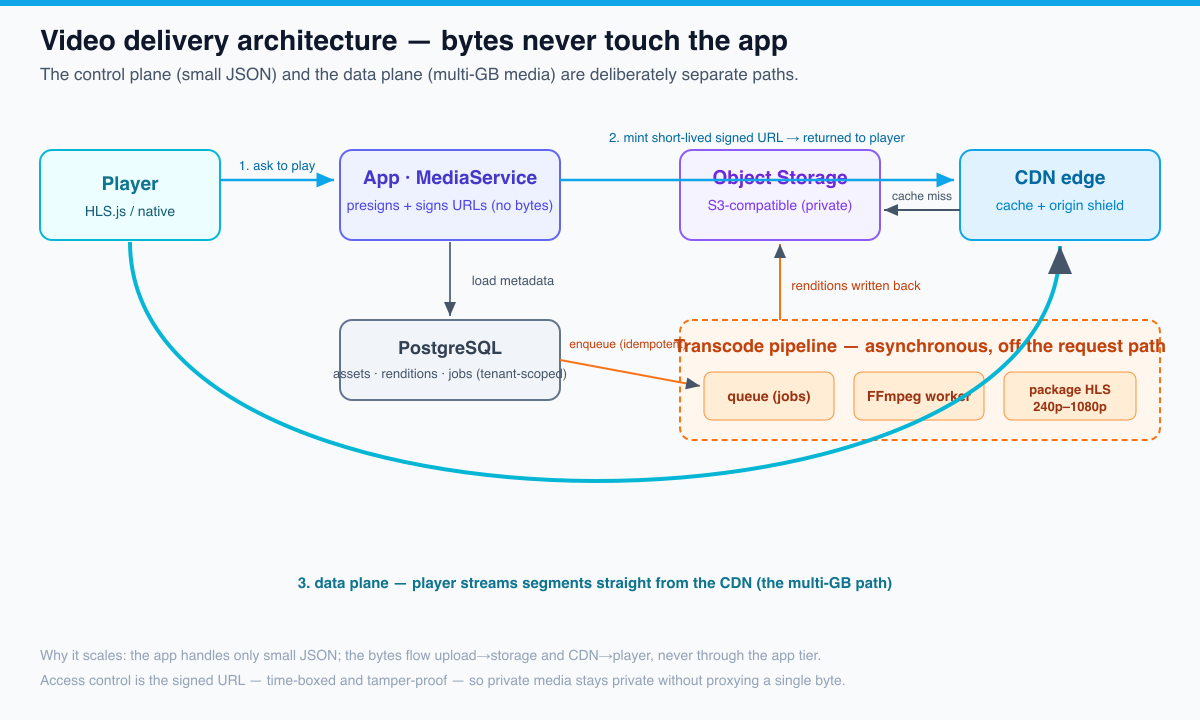
The thesis is simple and expensive to learn the hard way: a production video streaming architecture is defined not by the player you pick but by where the bytes flow. Get that wrong and a single course launch can melt your origin and triple your cloud invoice overnight. Get it right and the same launch is a non-event. Everything below — direct-to-storage uploads, an asynchronous transcoding pipeline, an adaptive-bitrate (HLS) ladder, a CDN with signed URLs, and the egress-cost engineering that keeps the project alive — exists to keep multi-gigabyte media off your application servers and to make a cross-tenant video leak structurally impossible rather than merely unlikely.
This article continues the Scholr case study from Part 2, where we built the multi-tenant data model, and it ships real, tested code in the companion repository. As always, the framing is the one we use across the series: the distributed-systems problem faced, the options considered, the solution implemented, and the trade-offs and what we’d do differently. If you want the broader arc — turning a working build into the asset you actually sell — see the demo-to-production playbook.
The war story: the month the video bill came in 3× over forecast
Scholr’s first eighteen months were text and slides. Then a marquee instructor — the kind with a mailing list of his own — launched a flagship course with forty high-definition lecture videos, and the growth team did its job. Thirty thousand learners hit the new videos in the first hour. The product worked. The videos played. Engineering went to bed feeling good.

Three weeks later the finance lead forwarded the cloud invoice with a single line: “Is this right?” The monthly media bill had come in at roughly three times the forecast. Not the compute. Not the database. The video line items: egress (bytes leaving the cloud to learners) and storage (every rendition of every video, kept hot, forever).
The post-mortem was humbling because nothing had “broken.” The architecture was doing exactly what we had built it to do, and that was the problem. Here is what we found:
- Every byte went out the most expensive door. Videos were served straight from the object store’s public endpoint — no CDN in front. Standard cloud egress runs roughly $0.085–$0.09/GB at the volumes we were at; a CDN would have been a fraction of that, and a committed-use commit a fraction again. We were paying the list price on millions of gigabytes.
- We shipped one giant file per video. No adaptive bitrate. A learner on hotel Wi-Fi pulled the same 1080p, ~2.5 GB-per-hour stream as someone on fiber — and when it rebuffered, the player re-requested. We paid egress for video people couldn’t even watch smoothly.
- The “cache” was the learner’s browser, and it was cold. Thirty thousand first plays meant thirty thousand origin fetches against the same handful of files. With a CDN, the second request onward is an edge hit at near-zero origin cost. We had a 0% offload ratio on a launch that was the textbook case for one.
- Storage never tiered down. Old course videos that nobody had watched in a year sat in hot storage at hot-storage prices.
The fix was not a heroic rewrite. It was an architecture that respects one rule — keep the bytes off the app and put a CDN in front of everything — plus the cost engineering to back it up. The rest of this article is that architecture, built into the Scholr codebase and verified in CI.
The four problems hiding inside “just play the video”
“Serving video” decomposes into four genuinely distinct distributed-systems problems, each with its own failure mode:
- The upload problem. Source videos are large (hundreds of MB to many GB) and networks are flaky. A naive multipart POST to your app server ties up a request thread for minutes, falls over on a dropped connection, and forces every byte through your application tier — the one place you least want them.
- The transcoding problem. A camera’s source file is not a streamable asset. You must transcode it into multiple renditions and package them for adaptive streaming. This is CPU-heavy, slow, and occasionally fails — so it cannot live on the request path, and it must be idempotent and retryable.
- The delivery problem. Getting bytes to thousands of concurrent learners cheaply and smoothly means a CDN, sensible cache keys, origin shielding, and adaptive bitrate — and access control that doesn’t require proxying bytes through your app.
- The cost problem. Egress and storage are the line items that quietly cancel projects. They must be engineered, measured, and alerted on like any other SLO.
We’ll take them in order, then look at the trade-offs we’d revisit.
Problem 1 — uploads: get the bytes off your app immediately
The single most important decision in the whole pipeline is also the least glamorous: the video bytes must never pass through your application servers. If a 4 GB upload streams through your Spring Boot tier, you’ve coupled your most precious, hardest-to-scale resource (request threads and app-server bandwidth) to the heaviest possible workload. One enthusiastic instructor uploading a course catalog can starve the threads that serve everyone else — the classic noisy neighbor.
The answer is direct-to-object-storage uploads via presigned URLs. The flow:
- The client asks the app, “I want to upload a video for course X.” The app authorizes the request (tenant + role), generates a presigned upload URL (a time-limited, single-purpose URL the object store will accept a PUT to), and returns it.
- The client uploads the bytes directly to the object store using that URL — ideally as a resumable, multipart upload so a dropped connection resumes instead of restarting.
- The store fires a notification (or the client calls back) and the app records the asset metadata. No video byte ever touched the app.
This is a one-way door worth walking through early. Retrofitting direct upload after you’ve built a proxying upload endpoint means re-plumbing your clients, your auth, and your storage permissions all at once. In the Scholr code, MediaController exposes a POST /api/videos that records metadata only — the bytes are assumed already in storage:
// MediaController — the bytes never touch this controller.
// Uploads go directly to object storage via a presigned URL;
// this endpoint only records the resulting metadata.
@PostMapping("/videos")
@ResponseStatus(HttpStatus.CREATED)
public AssetView registerUpload(@RequestBody RegisterUpload request) {
    return toView(media.registerUpload(request.courseId(), request.sourceKey()));
}
Two hardening steps belong here in production, even though they’re out of scope for the v1 slice: validation (verify the object is actually a video, check duration/codec, reject anything that doesn’t parse) and scanning (run uploads through a malware scan before they’re marked usable). Both run asynchronously, after the upload lands, for the same reason transcoding does — they’re slow and must not block.
Problem 2 — the transcoding pipeline: slow, expensive, and off the request path
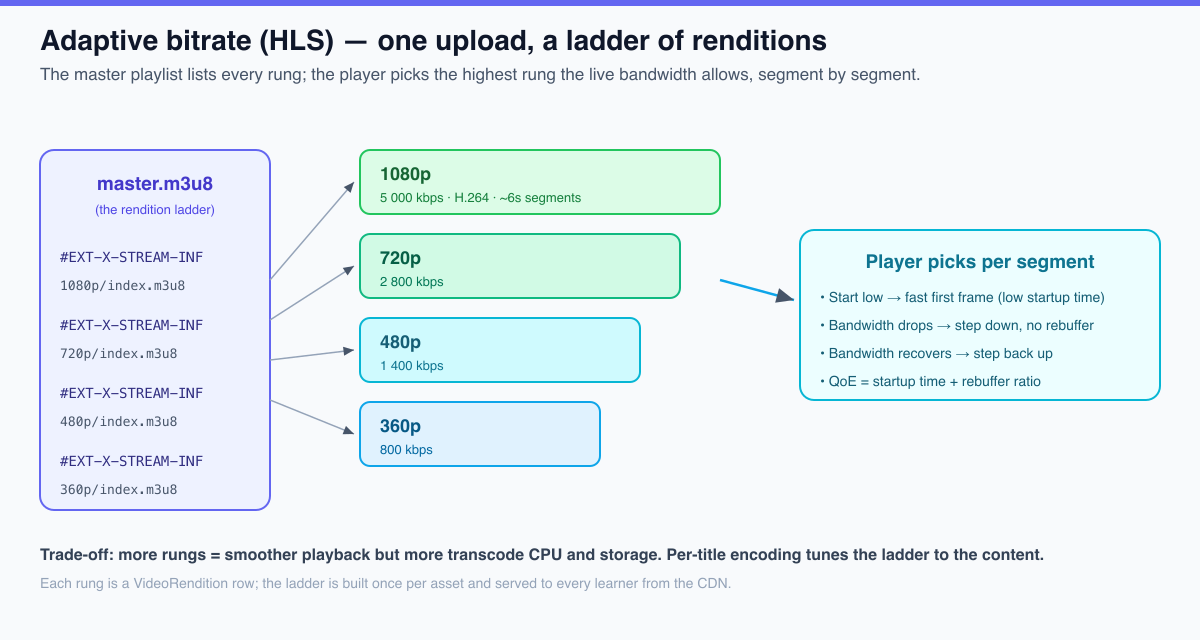
A source upload is not playable at scale. To stream adaptively you must produce an adaptive-bitrate ladder: several renditions of the same video at different resolutions and bitrates (e.g. 240p through 1080p+), each segmented into a few-second chunks and described by an HLS or DASH playlist. Add thumbnails, and — critically for both accessibility and SEO — captions and subtitles.
Transcoding is the textbook case for asynchronous work: it is CPU-bound, takes minutes to hours, and fails often enough that retries are mandatory. Two non-negotiable properties fall out of that:
- It runs off the request path. The upload handler returns the instant the metadata is saved; a worker (or a managed transcoder) drains a job queue out of band.
- It is idempotent. Upload callbacks fire more than once, clients retry on dropped connections, and workers crash mid-job. If “transcode this asset” can run twice, you’ll pay twice for the most expensive operation in the system — and possibly corrupt the asset’s state.
We solve idempotency exactly the way Part 2 solved idempotent enrollment: find-or-create keyed on a natural unique constraint. The transcode job carries a per-tenant idempotency_key with a unique index. Enqueue becomes a find-or-create, and the asset’s lifecycle is guarded by an optimistic-lock @Version so two concurrent “done” callbacks can’t both flip its state.
// MediaService.enqueueTranscode — off the request path AND idempotent.
// It writes a job row and flips the asset to TRANSCODING; it does NOT transcode.
// A duplicated upload callback or a client retry resolves to the SAME job
// instead of paying for a second (expensive) transcode.
@Transactional
public TranscodeJob enqueueTranscode(UUID assetId, String idempotencyKey) {
    return jobs.findByIdempotencyKey(idempotencyKey)
        .orElseGet(() -> {
            VideoAsset asset = loadAsset(assetId);
            asset.markTranscoding();
            assets.save(asset);
            return jobs.save(TranscodeJob.queue(assetId, idempotencyKey));
        });
}
When the transcoder finishes, a worker records the renditions and flips the asset to READY. That step is idempotent too — a (tenant_id, asset_id, height) unique constraint means a transcoder that delivers “done” twice (at-least-once delivery is the norm) cannot create duplicate rungs:
// completeTranscode — idempotent at the database level.
// A duplicate "done" callback re-runs this safely: existing rungs are skipped,
// markReady() is idempotent, and the unique constraint is the backstop.
@Transactional
public VideoAsset completeTranscode(UUID assetId, UUID jobId) {
    VideoAsset asset = loadAsset(assetId);
    for (int[] rung : DEFAULT_LADDER) {       // 360p, 480p, 720p, 1080p
        int height = rung[0], bitrate = rung[1];
        boolean exists = renditions.findByAssetIdOrderByHeightAsc(assetId).stream()
            .anyMatch(r -> r.height() == height);
        if (!exists) {
            String playlistKey = "renditions/" + assetId + "/" + height + "p/index.m3u8";
            renditions.save(VideoRendition.of(assetId, height, bitrate, playlistKey));
        }
    }
    asset.markReady();
    jobs.findById(jobId).ifPresent(job -> { job.complete(); jobs.save(job); });
    return assets.save(asset);
}
Build vs. buy the transcoder
Should you run FFmpeg on your own fleet or pay a managed transcoder (AWS MediaConvert, Mux, Cloudflare Stream, Coconut, etc.)? This is a genuine build-vs-buy decision, and the right answer depends on volume and how much you value engineering time.
| Approach | Up-front effort | Per-minute cost | Operational burden | Best when |
|---|---|---|---|---|
| Self-hosted FFmpeg workers | High (queue, autoscaling, retries, packaging) | Lowest at scale (just compute) | You own crashes, GPU/CPU sizing, codec upgrades | Very high, steady volume; a team that wants control |
| Cloud transcoding API (MediaConvert / Coconut) | Medium (integrate the API + storage) | ~$0.01–$0.05 per output minute | Vendor owns the encoders; you own orchestration | Most teams; spiky volume; you still want your own storage/CDN |
| Full video platform (Mux / Cloudflare Stream) | Lowest (upload → get a playback URL) | Highest (bundles transcode + storage + delivery) | Almost none — it’s a black box | Earliest stage; time-to-market over unit economics |
Scholr’s pragmatic path — and the one the code models — is the middle row: own your storage and your CDN, rent the encoders. That keeps your unit economics under your control (storage and egress are where the money is) while not paying engineers to babysit FFmpeg. The TranscodeJob abstraction means the encoder is swappable: self-hosted today, managed tomorrow, without touching the rest of the system.
Problem 3 — delivery: CDN, adaptive bitrate, and signed access
Why the CDN is non-negotiable
The CDN is the single highest-leverage component in the whole architecture. It does three things at once: it caches segments at the edge so the origin serves each file roughly once, it shields the origin so a launch spike doesn’t melt it, and it serves bytes from cheaper egress than your origin’s public endpoint. The Scholr launch failed precisely because it had none of this. The relevant lever is the cache offload ratio — the fraction of bytes served from edge cache rather than origin. A 95%+ offload ratio on popular videos is normal and turns a 30,000-person launch into a few hundred origin fetches.
The design details that make or break it:
- Cache-key design. Strip volatile query params (auth tokens, session ids) from the cache key, or every learner’s signed URL becomes a unique key and your hit rate collapses to zero. Sign with a scheme the CDN can validate without putting the signature in the cache key.
- Origin shielding. Designate one regional edge as the only one that talks to your origin; the rest fan out from it. Without it, a global launch means every edge POP independently fetching from origin.
- Pre-warming. For a known launch, push the new segments into the CDN before the doors open so the first learners hit a warm cache, not a stampede on a cold one.
Adaptive bitrate: HLS vs. DASH
Adaptive bitrate streaming (ABR) is how you serve a learner on hotel Wi-Fi and a learner on fiber from the same upload. The transcoder produces the ladder; a master playlist lists every rung; the player measures the live bandwidth and picks the highest rung it can sustain, segment by segment — stepping down on a dip to avoid a rebuffer, stepping back up when bandwidth recovers. The two metrics that matter are startup time (how fast the first frame paints) and rebuffer ratio (the fraction of watch time spent spinning). Treat them as first-class QoE SLOs, not afterthoughts.
Which packaging format? For an LMS in 2026, the honest answer is HLS first. Both formats do the same job; the difference is reach and tooling.
| Dimension | HLS (HTTP Live Streaming) | DASH (MPEG-DASH) |
|---|---|---|
| Origin / steward | Apple | MPEG / open standard |
| Native device support | Universal on Apple (Safari, iOS) and broadly elsewhere via JS players | No native Apple support; needs a JS player (dash.js) |
| Codec flexibility | Historically H.264/HEVC; now codec-agnostic (fMP4) | Fully codec-agnostic by design |
| DRM | FairPlay | Widevine / PlayReady (CENC) |
| Ecosystem / tooling maturity | Very mature; the de facto web default | Mature, common in Android/smart-TV-heavy stacks |
| LMS recommendation | Start here — widest reach, least friction | Add later if you need Widevine-grade DRM or a specific device matrix |
Because both can package the same fMP4 segments, “HLS now, DASH later” is increasingly a packaging concern, not a re-encode. That’s the modern reason to standardize on HLS without painting yourself into a corner.
Access control: signed URLs vs. tokens vs. full DRM
Paid course video has to be protected, but “protected” is a spectrum, and over-engineering it is its own failure. The mechanism Scholr uses — and the one in the code — is the signed URL: the object store and CDN are private, and the only way to fetch a playlist or segment is a URL the server signed, bound to a path and a short expiry. A leaked URL is useless within minutes, and a learner cannot forge one without the signing key, which never leaves the server.
// SignedUrlIssuer — mints short-lived, tamper-proof CDN URLs.
// The signature binds the path to an expiry; the key never leaves the server.
// This is the access-control boundary for paid video — no byte is proxied.
public String sign(String storageKey) {
    String path = storageKey.startsWith("/") ? storageKey : "/" + storageKey;
    long expiresAt = clock.instant().plus(ttl).getEpochSecond();
    String signature = hmac(path + ":" + expiresAt);
    return cdnBaseUrl + path + "?expires=" + expiresAt + "&signature=" + signature;
}
Issuing a signed URL touches no database and proxies no bytes — it is a cheap, hot-path operation, which is exactly why it scales. In MediaService.playbackUrl we refuse to sign a URL for an asset that isn’t READY, so a learner can never be handed a link to a half-transcoded asset. The full spectrum:
| Mechanism | What it stops | What it doesn’t | Cost / complexity | Use when |
|---|---|---|---|---|
| Signed URLs (time-boxed) | Hot-linking, casual URL sharing, scraping | A determined user re-recording the screen | Low — built into every CDN | Default for nearly all course video |
| Session tokens (per-user, bound to IP/session) | The above + sharing a single account widely | Screen capture; sophisticated proxying | Medium | High-value cohorts; concurrency limits |
| Forensic watermarking | Doesn’t prevent leaks — traces them to a user | Anything, in real time | Medium–High | Premium content where leak attribution matters |
| Full DRM (Widevine / FairPlay) | Decryption outside a secure media path | A phone pointed at the screen; adds device/format friction | High — licensing, key servers, format matrix | Studio-grade content or contractual DRM requirements |
For an LMS, signed URLs plus optional watermarking is almost always the right tier. Fortress-grade DRM solves a problem most education content doesn’t have, while adding cost, device-compatibility headaches, and support tickets. “Good enough” genuinely beats “fortress” here.
Problem 4 — egress cost engineering: the line item that cancels projects
Let’s put numbers on the war story, because this is the part teams hand-wave and then get a surprise invoice. Take a modest scenario: 10,000 learners each watch 10 hours of video in a month, at an average 1.5 GB/hour (a reasonable ABR blend, not all-1080p). That’s 150 TB of egress per month.
| Delivery path | Effective $/GB | Monthly egress cost (150 TB) | Notes |
|---|---|---|---|
| Object store public endpoint (no CDN) | ~$0.085 | ~$12,750 | The Scholr launch mistake |
| CDN, on-demand pricing | ~$0.04–$0.06 | ~$6,000–$9,000 | Plus a high cache-offload ratio reduces origin pulls to near zero |
| CDN with committed-use discount | ~$0.02–$0.03 | ~$3,000–$4,500 | Commit to monthly volume for a steep discount |
| CDN with zero-egress-fee provider | ~$0.00 egress (bandwidth bundled) | Effectively flat / bundled | Cloudflare-style pricing; check fair-use terms |
The spread between the top row and the bottom is the difference between a project that’s viable and one that isn’t — the same traffic, an order of magnitude apart in cost, decided entirely by architecture. The levers, in priority order:
- Always front storage with a CDN. This is the single biggest win and it’s not close.
- Maximize cache offload. Good cache keys + origin shielding push the offload ratio toward 95%+, so you pay origin egress roughly once per file, not once per learner.
- Right-size the ladder. Don’t ship 4K to a 360p audience. Per-title encoding and a sane top rung cut average GB/hour directly.
- Commit when volume is predictable. Committed-use discounts on a CDN routinely halve the per-GB rate once you have a steady baseline.
- Consider multi-CDN or a zero-egress provider for leverage and resilience — but only after the basics, or you’re optimizing the wrong thing.
Storage tiers and lifecycle
Egress is the big bill, but storage compounds quietly: every rendition of every video, kept hot forever. The fix is lifecycle policies that tier cold content down automatically.
| Tier | Indicative $/GB-month | Retrieval | Use for |
|---|---|---|---|
| Hot / standard | ~$0.023 | Instant | Active course videos and their renditions |
| Infrequent access | ~$0.0125 | Instant, small per-GB retrieval fee | Last year’s courses, occasionally watched |
| Archive / cold | ~$0.004 | Instant to minutes | Source masters kept for re-encoding; retired courses |
| Deep archive | ~$0.001 | Hours | Compliance retention; rarely if ever served |
A simple, high-value policy: keep source masters in archive (you rarely re-serve them, but you want them to re-encode into new codecs later), keep active renditions hot, and tier renditions to infrequent-access after N days without a play. Just moving stale renditions off hot storage often pays for itself.
Observability for video: you can’t manage what you don’t watch
Video has its own telemetry, distinct from your app metrics. Instrument and alert on:
- QoE metrics: startup time (P50/P95), rebuffer ratio, average bitrate served, playback failures. A rebuffer-ratio spike is the video equivalent of a latency alert.
- Cost/cache metrics: cache offload ratio, origin egress vs. CDN egress, GB/hour per rendition. A falling offload ratio is money leaking; alert on it.
- Pipeline metrics: transcode queue depth, job success/failure/retry rates, time-from-upload-to-READY. A growing queue is a launch backing up.
The Scholr media context, end to end
Part 3 adds a new Media bounded context to the modular monolith, tenant-scoped like everything else. The aggregate is the VideoAsset, with a guarded lifecycle:
// VideoAsset lifecycle — UPLOADED -> TRANSCODING -> READY/FAILED.
// markReady() is idempotent; the @Version optimistic lock means two concurrent
// "done" callbacks can't both flip the status and double-process the asset.
public enum AssetStatus { UPLOADED, TRANSCODING, READY, FAILED }
References across aggregates are by id (UUID), never by JPA association — the same rule we’ve held since Part 1. And the migration mirrors Part 2’s isolation pattern exactly: a tenant_id column, an index on it, and PostgreSQL Row-Level Security on every new table, so even a query that “forgets” the tenant filter cannot read another tenant’s media:
-- V2__media.sql — RLS on every media table, mirroring V1.
alter table video_assets     enable row level security;
alter table video_renditions enable row level security;
alter table transcode_jobs   enable row level security;

create policy tenant_isolation on video_assets
    using (tenant_id = current_setting('app.tenant_id', true)::uuid);
-- ...and the same for renditions and jobs.
The whole context is proven in MediaTest under mvn verify: tenant isolation on assets, idempotent enqueue (a duplicate callback never creates a second job), the full ABR ladder being packaged exactly once, and a signed URL that genuinely rejects tampering, expiry, path-swapping, and a wrong signing key.
Get the code and run it
The companion repository is public and MIT-licensed: github.com/muasif80/tutorial-lms-platform. It grows one part at a time on branches; main is the cumulative latest.
# this part, frozen:
git clone https://github.com/muasif80/tutorial-lms-platform.git
cd tutorial-lms-platform
git checkout part-3        # just Part 3's media context
# or: git checkout main    # everything through the latest part

# build + run the full proof (compile, unit, persistence, ArchUnit):
mvn verify
Concept → file map (every path verified in the part-3 commit):
| Concept | File |
|---|---|
| Media context public API | src/main/java/com/scholr/lms/media/MediaService.java |
| Asset aggregate + lifecycle | media/domain/VideoAsset.java, media/domain/AssetStatus.java |
| ABR ladder rung | media/domain/VideoRendition.java |
| Idempotent transcode job | media/domain/TranscodeJob.java |
| Signed CDN URL issuer | media/SignedUrlIssuer.java |
| Repositories (tenant-scoped) | media/internal/{VideoAsset,VideoRendition,TranscodeJob}Repository.java |
| REST surface | web/MediaController.java |
| Schema + RLS | src/main/resources/db/migration/V2__media.sql |
| The proof | src/test/java/com/scholr/lms/MediaTest.java |
What we’d do differently
Hindsight from the Scholr launch and from building this slice:
- CDN and direct-upload from day one. Both are one-way doors. Serving from a public storage endpoint and proxying uploads through the app were the two decisions that cost the most to unwind. If you build nothing else from this article, build these two first.
- Make egress a visible SLO, not a monthly surprise. A dashboard with offload ratio and GB/hour, alerting when offload drops, would have caught the launch problem in hour one instead of week three.
- Don’t reach for DRM reflexively. We spent a sprint scoping Widevine before realizing signed URLs plus watermarking covered the actual threat model. Match the protection to the content’s real value.
- Keep source masters in cheap archive. Codecs improve; AV1 will halve some bitrates. Keeping masters lets you re-encode for cheaper delivery later without re-collecting content from instructors.
- Per-title encoding earns its keep at scale. A fixed ladder is the right start, but tuning the ladder per video (a talking-head lecture needs far less bitrate than screen-share with motion) is a direct cut to the GB/hour that drives the whole bill.
Next in the series, we leave storage and delivery for correctness and concurrency: Part 4 builds the assessments and real-time engine — a deterministic auto-grading pipeline, idempotent submissions, and a WebSocket architecture that survives a 50,000-person live class. The thread that runs through both: the same idempotency and tenant-isolation primitives, applied to a completely different scaling problem. For the big-picture playbook on turning these builds into the asset you sell, see the demo-to-production guide.
Frequently asked questions
How do I let users upload large videos reliably?
Don’t proxy the bytes through your application. Have the app issue a presigned upload URL and let the client upload directly to object storage, ideally as a resumable, multipart upload so a dropped connection resumes instead of restarting. Your app only records metadata. This keeps multi-gigabyte transfers off your request threads and app-server bandwidth, which is the difference between an upload feature that scales and one that starves everyone else.
HLS or DASH for an LMS?
Start with HLS. It has the widest device reach (native on Apple, broadly supported elsewhere via JS players) and the most mature tooling, so it’s the path of least friction for an education audience. Because modern HLS and DASH can both package the same fMP4 segments, you can add DASH later — typically for Widevine-grade DRM or a specific device matrix — without re-encoding. “HLS now, DASH later” is mostly a packaging decision, not a rebuild.
How do I stop people downloading paid course videos?
Use signed, time-boxed URLs as your default: keep storage and the CDN private, and serve only URLs the server signed for a short window. That stops hot-linking, casual sharing, and scraping. Add forensic watermarking if you need to trace leaks back to a user, and reserve full DRM (Widevine/FairPlay) for genuinely studio-grade content — for most LMS video it adds cost and device friction without solving a threat you actually have. Nothing stops someone re-recording their screen, so match the protection to the content’s real value.
How do I control video egress costs?
Egress and storage, not compute, are what blow up a video budget. In priority order: (1) always front storage with a CDN — never serve from a public storage endpoint; (2) maximize the cache offload ratio with good cache keys and origin shielding so you pay origin egress roughly once per file; (3) right-size the ABR ladder so you’re not shipping 1080p/4K to a low-resolution audience; (4) take committed-use discounts once volume is predictable; and (5) consider a multi-CDN or zero-egress-fee provider. Then make egress a monitored SLO so a regression shows up on a dashboard, not on an invoice.
