
This is a complete, runnable Spring Security role-based access control example: a real login form, roles enforced at both the URL and method level, the tenant derived from the authenticated user, and a different server-rendered dashboard for each role — all built on the production LMS backend from the earlier parts.
Across ten parts we built a genuinely production-grade LMS backend — multi-tenant, idempotent, event-driven, observable, deployable. And then a reader asked the question that exposes the gap between an impressive architecture and a usable product: “How do I log in?” The honest answer was that you couldn’t. Every endpoint was open; the “tenant” was a header any client could forge; there was no concept of a user signing in, no enforced notion of who may do what. We had built a powerful engine with no ignition, no doors, and no driver’s seat. This part — the first of a short series extension — fixes that. It adds the thing that turns a backend into a platform people actually use: real authentication, enforced role-based access control, and a server-rendered UI where an admin, an instructor, and a student each log in and land on their own dashboard. And it does it the native Spring way: Spring Security and Thymeleaf, no separate frontend stack required.
The crisis framing this part is one of self-honesty rather than an outage. The platform looked finished — the architecture diagrams were complete, the tests were green, the system deployed with one command. But “looks finished” and “someone can use it” are different claims, and the distance between them is exactly authentication, authorization, and an interface. Role-based access control in particular had been designed (the role lived on a membership from Part 2; the article in Part 4 discussed RBAC versus ABAC) but never enforced — a discrepancy that is easy to let slide and dangerous to ship. This part closes it, and the small, instructive bug we hit doing so is a lesson in how multi-tenancy and transactions interact.
Server-rendered or single-page? For this, server-rendered.
The first decision is what kind of UI to build, and it is worth resisting the reflex that a “real” frontend must be a React or Next.js single-page app. For a working internal platform — dashboards, forms, role-gated pages — a server-rendered UI with Thymeleaf is faster to build, ships no client-side framework, and keeps the whole application in one deployable artifact you already have. Spring Boot includes Thymeleaf and Spring Security precisely so you can stand up a secured, multi-page application without bolting on a second tech stack, a second build pipeline, and a second deployment. The polished, public learner experience — the SSR + PWA frontend designed in Part 9 — is a separate concern you reach for when you need it; for getting a usable, role-aware platform running, server-rendered is the pragmatic, honest choice, and it is the one we make here.

| Approach | Best for | Cost |
|---|---|---|
| Server-rendered (Thymeleaf) — our choice | Dashboards, admin/internal tools, forms, role-gated pages | One artifact, one deploy; less rich interactivity |
| SPA (React/Next, Part 9) | The public learner app: rich, offline, SEO | A second stack, build, and deploy to run |
Authentication: a login, backed by a global credential
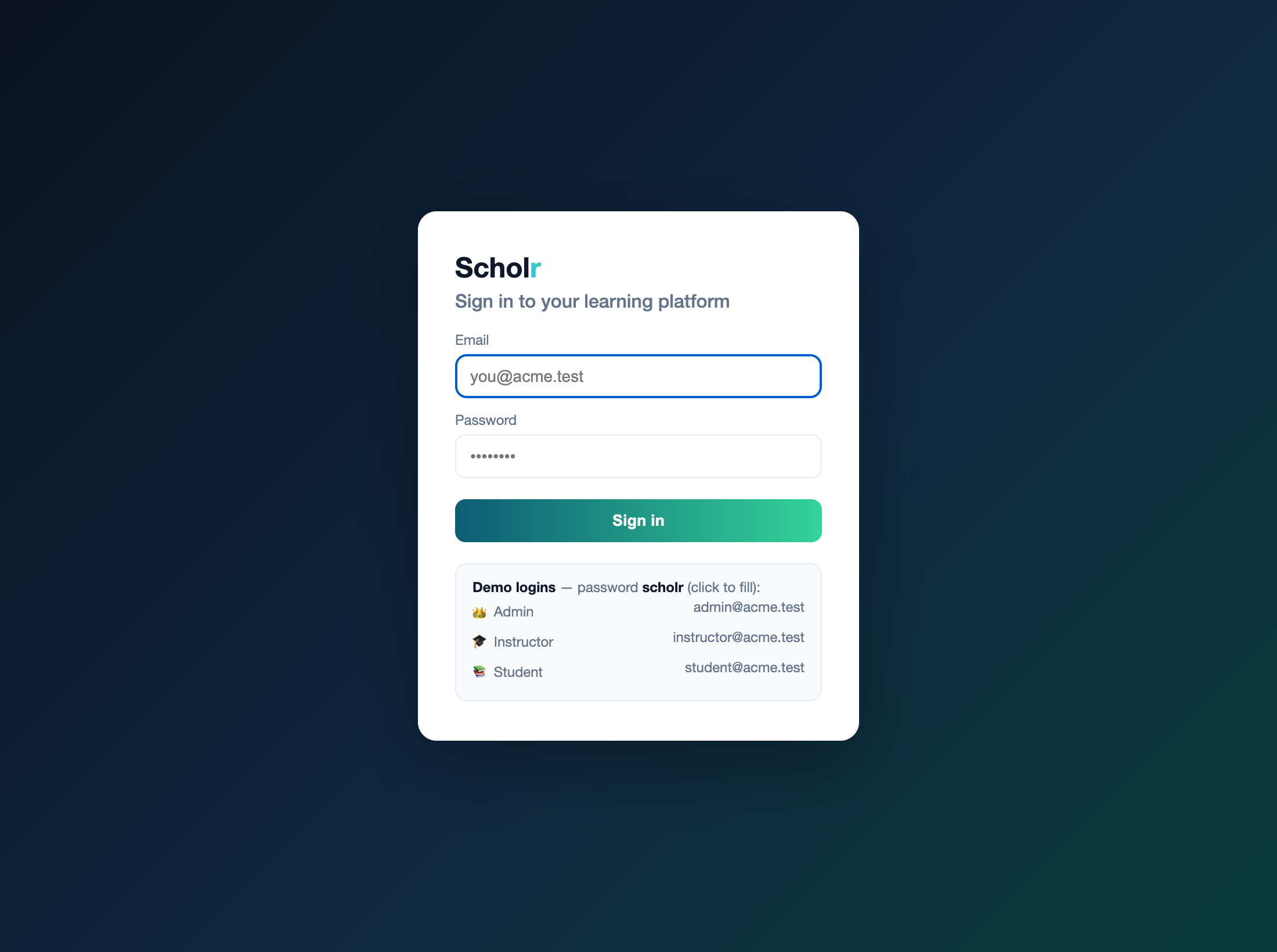
Authentication is where the platform learns who is making a request. We use Spring Security’s form login — a real /login page that posts an email and password, validated against a hashed credential. The one design decision that matters here is subtle and important for a multi-tenant system: the credentials table is global, not tenant-scoped. Login happens before any tenant context exists — you cannot know which tenant a request belongs to until you have identified the user — so the table the login query hits must be readable without a tenant filter. Everything else in the platform is tenant-scoped; the credential, uniquely, is not.
@Entity @Table(name = "credentials")   // GLOBAL — no @TenantId
public class Credential {
    @Id private UUID id;
    @Column(unique = true) private String email;
    private String passwordHash;        // BCrypt; plaintext never stored
    @Enumerated(EnumType.STRING) private Role role;   // LEARNER / INSTRUCTOR / ORG_ADMIN
    private UUID tenantId;               // the user's home tenant — set into context on login
    private UUID appUserId;              // links to the domain user
}
Spring Security loads this through a UserDetailsService that resolves a user by email and wraps it in a principal carrying the platform-specific facts the rest of the app needs — the domain user id, the tenant, and the role:
public UserDetails loadUserByUsername(String email) {
    return credentials.findByEmail(email).map(UserPrincipal::new)
        .orElseThrow(() -> new UsernameNotFoundException("no account for " + email));
}
Passwords are hashed with BCrypt; the plaintext never touches the database. The login form, the session, and the password verification are all Spring Security’s machinery — the value we add is the model that ties a login to a role and a tenant.
A few production-grade details come essentially for free once Spring Security is in place, and are worth naming because skipping them is how auth goes wrong. Session management: after login, the user holds a server-side session (a cookie), and a real deployment fixes the session against fixation attacks (Spring Security rotates the session id on login by default) and bounds concurrent sessions. Logout is a first-class endpoint that invalidates the session and clears the principal, so “sign out” actually signs you out. CSRF protection guards state-changing form posts; a public deployment keeps it on with a token in each form (we relax it here only to keep the demo’s form posts simple). And password policy — minimum strength, rotation, lockout after repeated failures — is configuration on top of the same encoder, not a rewrite. The point is that authentication is not a feature you hand-roll; it is a well-trodden framework concern where the dangerous move is to invent your own, and the safe move is to configure a battle-tested one correctly.
One relationship deserves to be explicit because it is where this part meets Part 2. The role lives in two places, deliberately. The authoritative copy is on the per-tenant Membership — a user can be an instructor in one organization and a learner in another, so the role is genuinely a property of the membership, not the global person. But login is tenant-less, so it cannot read a tenant-scoped membership; it needs the role available on the global credential. So the credential carries a mirror of the role for the user’s home tenant — denormalized for the one query that must run before a tenant exists. The seeder keeps the two in sync when it creates an account; a fuller system would treat the membership as the source of truth and project changes onto the credential. The lesson is the recurring one of this series: when a piece of data must be read in a context where the normal scoping doesn’t apply, you denormalize it deliberately, and you own the consistency that costs.
RBAC: roles that are actually enforced
Now the pillar. Role-based access control is the rule that a user may only reach what their role permits, and the difference between RBAC that is discussed and RBAC that is enforced is a few lines of security configuration that the build can never let regress. Each role maps to a Spring authority — ORG_ADMIN → ROLE_ADMIN, INSTRUCTOR → ROLE_INSTRUCTOR, LEARNER → ROLE_STUDENT — and the URL space is gated on those authorities:
http.authorizeHttpRequests(auth -> auth
    .requestMatchers("/login", "/css/**", "/actuator/**", "/api/**", "/swagger-ui/**").permitAll()
    .requestMatchers("/admin/**").hasRole("ADMIN")
    .requestMatchers("/instructor/**").hasRole("INSTRUCTOR")
    .requestMatchers("/learn/**").hasRole("STUDENT")
    .anyRequest().authenticated());
This is small, but it is the whole guarantee: a student who navigates to /admin gets a 403 Forbidden, every time, enforced by the framework rather than by a check a developer might forget. The role itself lives where Part 2 put it — on the per-tenant Membership — and is mirrored onto the credential so login (which is tenant-less) can read it. RBAC was designed in Parts 2 and 4; here it becomes a property of the running system, verified by the same kind of test that proves tenant isolation: log in as each role, assert each is allowed into its own area and forbidden from the others.
| URL pattern | Required role | A wrong-role request gets |
|---|---|---|
/admin/** |
ROLE_ADMIN | 403 Forbidden |
/instructor/** |
ROLE_INSTRUCTOR | 403 Forbidden |
/learn/** |
ROLE_STUDENT | 403 Forbidden |
/login, /api/**, /actuator/**, /swagger-ui/** |
public | allowed |
| everything else | authenticated | redirect to /login |
Proving RBAC, not assuming it
RBAC that is configured but untested is RBAC you are hoping works, and authorization bugs are exactly the kind that hide until someone exploits them. So the access rules are proven the same way tenant isolation was proven in earlier parts — by a test that logs in as each role and asserts both halves of the guarantee: that the role can reach its own area, and that it is forbidden from the others. Logging in as a student and requesting /admin must return 403; logging in as an admin and requesting /learn must return 403; each role’s own dashboard must return 200. This is cheap to write and it is the difference between “we configured RBAC” and “we know a student cannot reach the admin console.” The same discipline extends to authorization beyond URL roles: an instructor may grade only their cohorts (an attribute-based check, as Part 4 discussed), and those finer rules each deserve their own test, because every authorization rule you don’t test is one you are trusting on faith.
| Logged in as | GET /admin | GET /instructor | GET /learn |
|---|---|---|---|
| Admin | 200 ✓ | 403 | 403 |
| Instructor | 403 | 200 ✓ | 403 |
| Student | 403 | 403 | 200 ✓ |
| Unauthenticated | redirect to /login | ||
Tenant from the identity, not a header
Here is where this part quietly upgrades the entire platform’s isolation story. For ten parts, the tenant was set from an X-Tenant-Id header — fine for a backend reference, but a header is something a client supplies, and “the client tells us which tenant it is” is not a security boundary. Now that requests are authenticated, the tenant comes from who is logged in. A small filter runs after Spring Security has authenticated the request, reads the principal, and pins the tenant context for the duration of the request:
// after authentication, set the tenant from the principal — not a trusted header
if (auth != null && auth.getPrincipal() instanceof UserPrincipal principal) {
    TenantContext.set(TenantId.of(principal.tenantId()));
}
try { chain.doFilter(request, response); }
finally { TenantContext.clear(); }   // never leak tenant state across requests
The effect is that a logged-in instructor at Acme University can only ever see Acme’s data, because the tenant is derived from their authenticated identity and travels with the request, cleared at the end so a pooled thread never carries one tenant’s context into another’s request. The two-layer isolation from Part 2 — Hibernate’s @TenantId filter plus PostgreSQL Row-Level Security — is unchanged; what changed is that the tenant feeding it is now trustworthy. Isolation is no longer “the client claims to be Acme”; it is “this authenticated user belongs to Acme.”
The war story: a seeder, a transaction, and a tenant fixed at the wrong moment
To make the platform usable the instant it starts, a seeder creates a demo tenant on first boot — an organization, an admin, instructors, students (each with a login), and some courses, cohorts, and enrollments. The first deployment of it crash-looped, with the same error each restart:
insert or update on table "memberships" violates foreign key constraint
Detail: Key (tenant_id)=(00000000-0000-0000-0000-000000000000)
        is not present in table "organizations".
The all-zeros tenant id is the reserved system tenant — the fallback the resolver returns when no tenant context is set. But the seeder did set the context, right after creating the organization, before saving any memberships. So why did the memberships get the system tenant?
The cause is a genuinely subtle interaction between Hibernate’s discriminator multi-tenancy and transaction boundaries, and it is worth understanding because it will bite anyone using @TenantId. Hibernate resolves the current tenant once, when the session opens — not per entity, per save. The seeder method was annotated @Transactional, which opened a single session at method entry. At that instant — before the line that set the tenant context — the resolver was consulted, found no tenant, and fixed the session’s tenant to the system default for the entire method. Every @TenantId entity saved afterward, no matter that the context had since been set, inherited that frozen system tenant. The membership’s tenant id pointed at an organization that didn’t exist, and the foreign key, correctly, refused it.
The fix is to stop wrapping the seeding in one big transaction. Without the method-level @Transactional, each service call (which is itself transactional) opens its own session after the tenant context is set, so the resolver returns the right tenant and every entity is stamped correctly. The lesson generalizes beyond seeders: set your tenant context before the transaction that needs it begins, because the session’s tenant is decided at the moment it opens. It is also a reminder that some bugs live only at runtime against the real database — this one never appeared in the test suite, because the tests set the tenant directly and don’t exercise the session-open timing against PostgreSQL the way a live boot does.
Three roles, three dashboards, one enroll flow
With auth and RBAC in place, the UI falls out naturally. The home route reads the authenticated role and redirects each user to their own dashboard — the visible payoff of the whole part. The admin lands on a console showing the organization’s people and roles, course counts, and — the action that makes “enrolling instructors and students” real — a form to add a new instructor or student, which creates the domain user, grants the per-tenant role, and issues their login in one consistent operation. The instructor lands on a workspace of their courses and cohorts. The student lands on a learning home with a continue-learning prompt and the available courses. Each is a server-rendered Thymeleaf page reading the tenant-scoped services, sharing one design-token CSS so the three surfaces feel like one product.
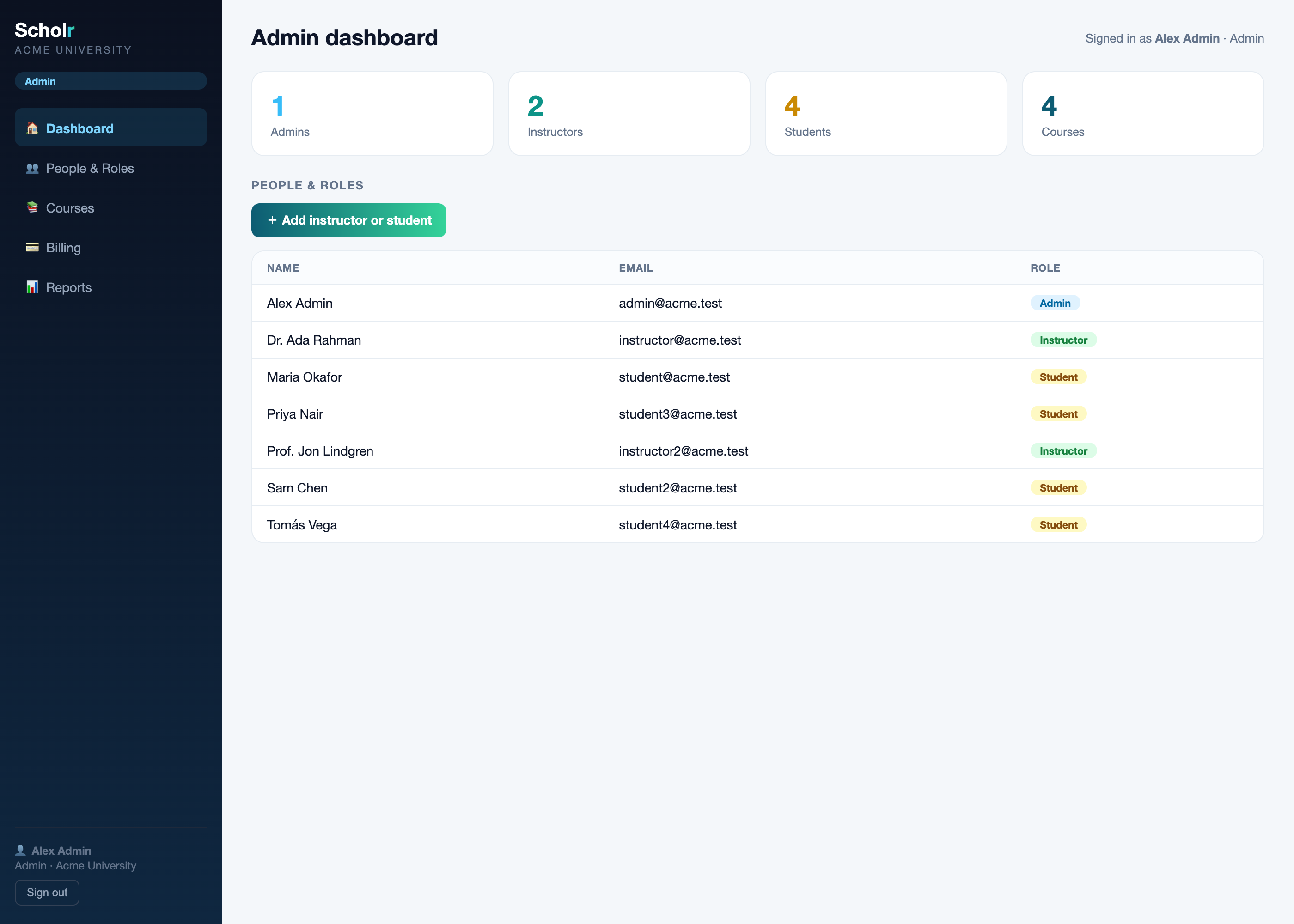
Adding an account is the seed of the admin console the next parts build out, and it already demonstrates the consistency that RBAC demands: a person is a domain user, a role on a membership, and a login credential, created together so they can never drift. The admin clicks “add,” and a moment later that instructor or student can sign in and land on their dashboard — the loop the platform exists to close.
What this is — and honestly, what it isn’t yet
It is worth being precise about the line this part draws, because the gap between “a platform you can log into” and “a platform with every flow built end-to-end” is real. Done: real authentication, enforced RBAC, identity-derived tenancy, three role dashboards, the admin’s create-account flow, a seeded demo tenant, and the OpenAPI/Swagger docs for the REST API — all running, all on one docker compose up. Not yet: the deep per-role flows — an instructor authoring courses and lessons and grading; a student moving through catalog, enrollment, the course player, an assessment, and a certificate; the full admin console. Those are the next parts of this extension. This part is the foundation they stand on: without login, roles, and a trustworthy tenant, none of those flows could be built safely. With them, each is just another role-gated page over services that already exist.
Get the code and run it
Everything here is in the companion repository, evolving the same codebase the series has built since Part 1. Each part has its own branch; main holds the latest cumulative code — and it now boots a usable platform you can log into.
# this part's exact code:
git clone https://github.com/muasif80/tutorial-lms-platform.git
cd tutorial-lms-platform
git checkout part-11

# run the whole platform — Postgres + the app, schema and demo data seeded:
docker compose up -d --build
open http://localhost:8080/login      # sign in and land on your dashboard
Demo logins (password scholr): [email protected], [email protected], [email protected] — each lands on its own dashboard, and each is forbidden from the others’ (a student visiting /admin gets a 403). Where each idea lives in the code:
- Authentication —
auth/domain/Credential.java(global),auth/AppUserDetailsService.java,auth/SecurityConfig.java(form login). - Enforced RBAC — the URL rules in
auth/SecurityConfig.java; the role-to-authority map inauth/UserPrincipal.java. - Tenant from the identity —
auth/TenantPrincipalFilter.java. - The seeded demo tenant —
config/DataSeeder.java(and the transaction lesson within it). - The role dashboards + admin enroll flow —
web/ui/UiController.javaand the Thymeleaf templates underresources/templates/. - API docs — Swagger UI at
/swagger-ui.html.
Frequently asked questions
How do I add login and role-based access control to a Spring Boot app?
Use Spring Security. Add the security starter, expose a form-login page, and back it with a UserDetailsService that loads a user (with a BCrypt-hashed password) by username. Map each user’s role to a Spring authority and gate URLs with authorizeHttpRequests — for example requestMatchers("/admin/**").hasRole("ADMIN") — so a wrong-role request gets a 403 enforced by the framework, not by a check you might forget. That URL-level enforcement is what turns RBAC from a design idea into a guarantee.
Where should login credentials live in a multi-tenant app?
In a global table that is not tenant-scoped, because login happens before any tenant context exists — you can’t filter by tenant until you’ve identified the user. Store the email, a hashed password, the user’s role, and their home tenant id on that global credential. On successful login, set the tenant context from the authenticated principal so every subsequent query is correctly scoped. Everything else stays tenant-scoped; the credential is the deliberate exception.
Should I derive the tenant from a header or from the logged-in user?
From the logged-in user. A header like X-Tenant-Id is supplied by the client, so trusting it for isolation means trusting the client not to lie — not a security boundary. Once requests are authenticated, set the tenant from the principal in a filter that runs after authentication, and clear it at the end of the request so a pooled thread never leaks one tenant’s context into another’s. Your database-level isolation (a tenant discriminator plus row-level security) is only as trustworthy as the tenant value feeding it.
Do I need a separate React/Next.js frontend, or can Spring render the UI?
For dashboards, admin tools, and role-gated pages, Spring’s built-in Thymeleaf renders a perfectly good server-side UI in the same deployable as your backend — no second stack, build, or deploy. Reach for a single-page app (React, Next.js) when you need a rich, offline-capable, SEO-optimized public experience. Many platforms use both: server-rendered internal tools and a SPA for the public learner app.
Conclusion
A backend nobody can log into is a demo, however good its architecture. This part turned the engine into a platform: real authentication, role-based access control enforced at the framework level, a tenant derived from the authenticated identity rather than a trusted header, and three server-rendered dashboards that each role lands on after signing in — with the admin already able to enroll instructors and students. We also learned, the way these things are usually learned, that Hibernate fixes a session’s tenant when the session opens, so the tenant context must be set first. The platform now has a front door, a driver’s seat, and a doorman who checks roles.
The full, running implementation is on the part-11 branch of the companion repository — one docker compose up and you can log in as an admin, instructor, or student. ⭐ Star it to follow the build. Next, we build the instructor workspace end-to-end: authoring courses and lessons, managing cohorts and rosters, and grading — the first of the deep per-role flows that make this a platform you’d actually run a course on.
