
Over the 5-part series we built an LLM-agnostic engine that scores vendor proposals against an RFP — a LangGraph workflow with RAG, deterministic weighted scoring, and a human-in-the-loop shortlist gate. It works beautifully from the CLI. But a CLI doesn’t sell. To put this engine in front of procurement teams you need a dashboard: upload a proposal, watch it get evaluated live, see the fit score and requirement breakdown as rich charts, and approve borderline cases with one click.
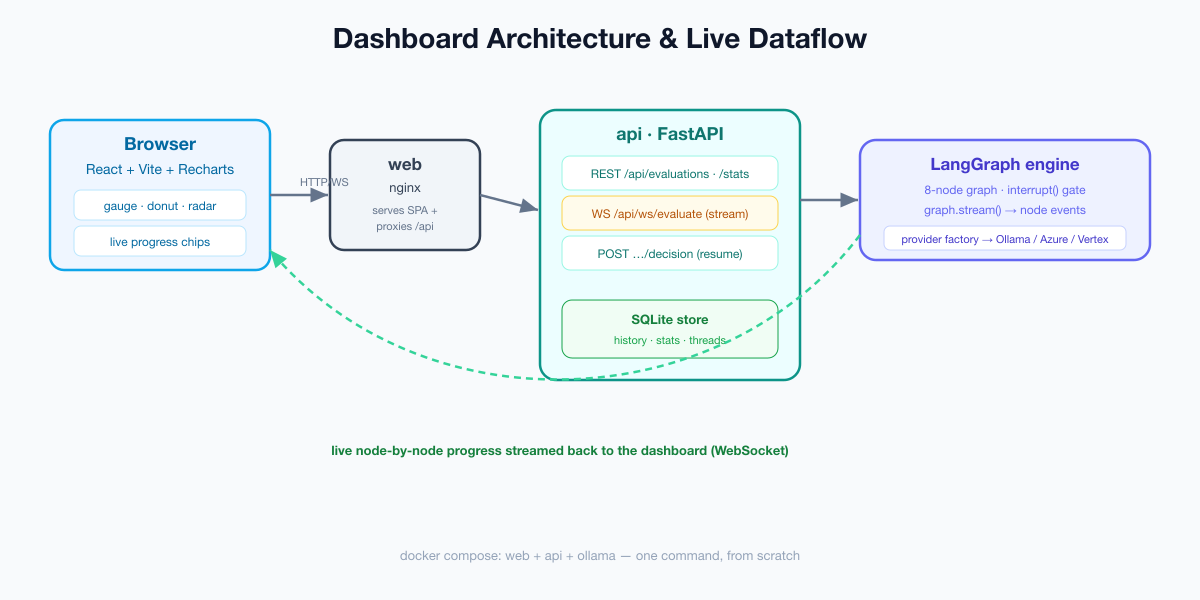
This 2-part mini-series builds that dashboard. Part 1 (this article) is the backend: a FastAPI service that wraps the engine with a clean REST API, streams live evaluation progress over a WebSocket, and persists every evaluation to SQLite so the UI has history and aggregate stats to chart. Part 2 builds the React frontend. By the end of this article you’ll have a running API and a complete docker-compose that stands up the whole stack from scratch.
What the backend needs to do
A dashboard is only as good as the API beneath it. Ours has to:

- Run an evaluation on demand (proposal text + RFP id) and return the fit score, recommendation, and per-requirement assessments.
- Stream progress live — the engine has eight nodes; users should watch each one light up, not stare at a spinner.
- Persist evaluations so the dashboard can show history and aggregate charts (averages, distributions, shortlist vs reject).
- Support the human gate — borderline proposals pause; the UI must be able to submit a decision and resume.
- Be reachable from a browser — CORS for development, a reverse proxy in production.
That maps cleanly to a small FastAPI app plus a tiny persistence layer. Let’s build it.
Step 1 — A tiny persistence layer
The dashboard needs data to chart, so every evaluation is saved. We use the standard-library sqlite3 — no extra dependency — wrapped in a small store. It records the vendor, RFP, fit score, recommendation, status, the thread id (for resuming the human gate), and the full assessments as JSON.
class EvaluationStore:
    def __init__(self, path="rfpeval_dashboard.sqlite"):
        self.path = path
        with self._conn() as c:
            c.executescript(SCHEMA)

    def insert(self, *, rfp_id, thread_id, status, vendor=None, fit_score=None,
               recommendation=None, summary=None, report_markdown=None, assessments=None):
        eid = uuid.uuid4().hex
        with self._conn() as c:
            c.execute("INSERT INTO evaluations (...) VALUES (...)", (...))
        return eid

    def list(self, limit=50):
        with self._conn() as c:
            rows = c.execute(
                "SELECT * FROM evaluations ORDER BY created_at DESC LIMIT ?", (limit,)
            ).fetchall()
        return [self._row(r) for r in rows]
The one method that makes the dashboard feel alive is stats() — it computes everything the summary charts need in a single pass: totals, counts by recommendation, the average fit score, and a five-bucket score distribution.
def stats(self):
    rows = ...  # SELECT recommendation, fit_score FROM evaluations
    by_rec = {"shortlist": 0, "reject": 0, "review": 0}
    scores = []
    for r in rows:
        if r["recommendation"] in by_rec:
            by_rec[r["recommendation"]] += 1
        if r["fit_score"] is not None:
            scores.append(r["fit_score"])
    buckets = [0, 0, 0, 0, 0]
    for s in scores:
        buckets[min(int(s) // 20, 4)] += 1
    return {
        "total": len(rows),
        "by_recommendation": by_rec,
        "avg_fit_score": round(sum(scores) / len(scores), 1) if scores else 0,
        "score_buckets": {"0-19": buckets[0], "20-39": buckets[1], "40-59": buckets[2],
                          "60-79": buckets[3], "80-100": buckets[4]},
    }
Keeping aggregation in SQL-adjacent Python (rather than asking the LLM for “stats”) is the same discipline as the engine’s deterministic scoring: numbers that drive decisions should be reproducible, not generated.
Step 2 — The REST API
Now the FastAPI app. We build the LangGraph engine once (lazily) and reuse it, add CORS so the React dev server can call us, and expose the read endpoints the dashboard polls.
app = FastAPI(title="RFP Evaluator Dashboard API", version="0.1.0")
app.add_middleware(CORSMiddleware, allow_origins=["*"],
                   allow_methods=["*"], allow_headers=["*"])

store = EvaluationStore()
_graph = None

def graph():
    global _graph
    if _graph is None:
        _graph = build_graph()
    return _graph

@app.get("/api/health")
def health():
    return {"status": "ok", "provider": get_settings().llm_provider.value}

@app.get("/api/rfps")
def rfps():
    return {"rfps": available_rfps()}

@app.get("/api/stats")
def stats():
    return store.stats()

@app.get("/api/evaluations")
def list_evaluations():
    return {"evaluations": store.list()}
The core write endpoint runs an evaluation. It writes the proposal text to a temp file (the engine’s load_proposal node reads a path), invokes the graph on a fresh thread id, and branches on whether the engine paused at the human gate:
@app.post("/api/evaluations")
def create_evaluation(req: EvalRequest):
    path = _write_temp(req.text)
    thread_id = uuid.uuid4().hex
    config = {"configurable": {"thread_id": thread_id}}
    try:
        result = graph().invoke({"proposal_path": path, "rfp_id": req.rfp_id}, config)
    finally:
        os.unlink(path)

    common = dict(rfp_id=req.rfp_id, thread_id=thread_id, vendor=result.get("vendor"),
                  fit_score=result.get("fit_score"), recommendation=result.get("recommendation"),
                  summary=result.get("summary"), assessments=result.get("assessments"))

    if "__interrupt__" in result:
        eid = store.insert(status="needs_review", **common)
        return {"id": eid, "status": "needs_review", "fit_score": result.get("fit_score"),
                "recommendation": result.get("recommendation"),
                "interrupt": result["__interrupt__"][0].value}

    eid = store.insert(status="completed", report_markdown=result.get("report_markdown"), **common)
    return {"id": eid, "status": "completed", "fit_score": result.get("fit_score"),
            "recommendation": result.get("recommendation"),
            "report_markdown": result.get("report_markdown")}
That "__interrupt__" in result check is the whole human-in-the-loop integration on the API side: when the engine’s interrupt() fires, LangGraph returns the paused state with that key, and we persist the evaluation as needs_review with its thread id so we can resume it later.
Step 3 — Resuming the human gate
When a reviewer makes a decision in the UI, we look up the stored thread id and resume the graph with a Command(resume=...) carrying the decision:
@app.post("/api/evaluations/{eid}/decision")
def submit_decision(eid: str, req: DecisionRequest):
    rec = store.get(eid)
    if not rec:
        raise HTTPException(status_code=404, detail="evaluation not found")
    config = {"configurable": {"thread_id": rec["thread_id"]}}
    result = graph().invoke(
        Command(resume={"decision": req.decision, "notes": req.notes}), config
    )
    store.update(eid, status="completed",
                 recommendation=result.get("recommendation"),
                 report_markdown=result.get("report_markdown"))
    return {"id": eid, "status": "completed", "report_markdown": result.get("report_markdown")}
For this to work across requests — and across restarts or multiple workers — the engine must use a durable checkpointer. Our engine already supports that: set CHECKPOINTER=sqlite and the paused state is persisted, so a decision submitted minutes later resumes exactly where the graph stopped.
Step 4 — Live progress over a WebSocket
This is what makes the dashboard feel alive. Instead of invoking the graph and waiting, we stream() it and forward each node completion to the browser as it happens. LangGraph’s stream_mode="updates" yields a dict of {node_name: partial_state} after every step.
@app.websocket("/api/ws/evaluate")
async def ws_evaluate(ws: WebSocket):
    await ws.accept()
    req = await ws.receive_json()
    rfp_id = req.get("rfp_id", "sample_rfp")
    path = _write_temp(req.get("text", ""))
    thread_id = uuid.uuid4().hex
    config = {"configurable": {"thread_id": thread_id}}
    state = {}
    try:
        for update in graph().stream(
            {"proposal_path": path, "rfp_id": rfp_id}, config, stream_mode="updates"
        ):
            for node, partial in update.items():
                if node == "__interrupt__":
                    continue
                if partial:
                    state.update(partial)
                await ws.send_json({"type": "progress", "node": node})

        if "report_markdown" in state:           # ran to completion
            eid = store.insert(status="completed", report_markdown=state["report_markdown"], ...)
            await ws.send_json({"type": "completed", "id": eid,
                                "fit_score": state.get("fit_score"),
                                "recommendation": state.get("recommendation"),
                                "assessments": state.get("assessments")})
        else:                                     # paused at the human gate
            eid = store.insert(status="needs_review", ...)
            await ws.send_json({"type": "needs_review", "id": eid,
                                "thread_id": thread_id,
                                "fit_score": state.get("fit_score"),
                                "assessments": state.get("assessments")})
    finally:
        os.unlink(path)
The browser receives a stream of {"type":"progress","node":"retrieve_requirements"} events and lights up each step, then a terminal completed or needs_review message. Detecting the pause is elegant: if the stream ends without ever producing report_markdown, the engine stopped at human_review — so we emit needs_review with the evaluation id the UI needs to submit a decision.
One honest caveat: graph.stream() is synchronous, so calling it inside an async handler blocks the event loop for the duration. For a demo that’s fine; in production you’d run the stream in a worker (or a thread) and push events onto an async queue. We keep it simple here and call it out rather than hide it.
Step 5 — Package it: complete docker-compose
Here’s the whole stack from scratch — the React UI (we build it in Part 2), the FastAPI API, and Ollama, wired together. No API keys required.
services:
  ollama:
    image: ollama/ollama:latest
    volumes: [ "ollama:/root/.ollama" ]
    healthcheck:
      test: ["CMD", "ollama", "list"]
      interval: 10s
      timeout: 5s
      retries: 5

  api:
    build: .
    command: ["uvicorn", "rfpeval.dashboard:app", "--host", "0.0.0.0", "--port", "8000"]
    environment:
      LLM_PROVIDER: ollama
      OLLAMA_BASE_URL: http://ollama:11434
      CHECKPOINTER: sqlite              # durable human-in-the-loop resume
      DASHBOARD_DB: /data/dashboard.sqlite
    volumes: [ "apidata:/data" ]
    ports: [ "8000:8000" ]
    depends_on:
      ollama: { condition: service_healthy }

  web:
    build: ./web
    ports: [ "8080:80" ]
    depends_on: [ api ]

volumes:
  ollama:
  apidata:
docker compose -f docker-compose.full.yml up -d --build
docker compose -f docker-compose.full.yml exec ollama ollama pull llama3.1:8b
docker compose -f docker-compose.full.yml exec ollama ollama pull nomic-embed-text
# API now live at http://localhost:8000/api/healthTesting the API offline
The whole thing is testable without a model or network. We stub the LLM and retriever (the same fakes the engine’s tests use), point the store at a temp database, and exercise the endpoints with FastAPI’s TestClient:
def test_create_evaluation_persists(tmp_path, monkeypatch, patch_pipeline):
    from rfpeval import dashboard
    monkeypatch.setattr(dashboard, "store", EvaluationStore(str(tmp_path / "d.sqlite")))
    monkeypatch.setattr(dashboard, "_graph", None)
    patch_pipeline(assessments=[{"requirement_id": "R1", "requirement": "Omnichannel",
                                 "status": "met", "rationale": "ok", "evidence": ""}],
                   requirements=[{"requirement_id": "R1", "weight": 5}])
    client = TestClient(dashboard.app)
    r = client.post("/api/evaluations", json={"text": "Acme proposal", "rfp_id": "sample_rfp"})
    assert r.json()["fit_score"] == 100
    assert dashboard.store.stats()["total"] == 1
REST vs WebSocket: when to use which
| Need | Use | Why |
|---|---|---|
| History, stats, detail | REST | Simple request/response; cacheable |
| Live evaluation progress | WebSocket | Server pushes node events as they happen |
| Submitting a human decision | REST | One-shot action that resumes the graph |
| Multiple concurrent viewers | REST polling + WS | Poll stats; stream the active run |
Troubleshooting & common errors
| Symptom | Cause | Fix |
|---|---|---|
| Browser blocked by CORS | No CORS middleware | Add CORSMiddleware (shown above) for the dev origin |
| WebSocket 403 / fails to connect | Proxy not upgrading the connection | Set Upgrade/Connection headers in nginx (Part 2) |
/decision says “not found” or won’t resume |
In-memory checkpointer or different worker | Use CHECKPOINTER=sqlite so state is durable |
| API feels frozen during a run | Sync stream() blocking the loop |
Offload to a worker/thread in production |
| Stats never change | Store path differs per process | Mount a shared volume for the SQLite file |
What’s next
The engine now has a real API: REST for history and stats, a WebSocket for live progress, durable human-in-the-loop, and a one-command Docker stack. In Part 2 we build the frontend that makes it shine — a React + Vite + Recharts dashboard with a fit-score gauge, a requirement-coverage radar, live progress chips, and a one-click human-review panel.
Frequently asked questions
Why a WebSocket instead of polling?
The engine runs as a sequence of nodes; a WebSocket lets the server push each node’s completion the instant it happens, so the UI shows real live progress instead of a spinner. Polling can’t match that responsiveness without hammering the server.
How does the human-in-the-loop survive a page refresh?
The paused evaluation is stored with its LangGraph thread id, and the engine uses a durable SQLite checkpointer. Submitting a decision later resumes the exact paused state — even on a different worker.
Do I need a database server?
No. We use the standard-library SQLite for both the checkpointer and the evaluation history, which is plenty for a single-server dashboard. Swap in Postgres when you scale horizontally.
Conclusion
A great AI demo dies in a terminal; a great AI product lives in a dashboard. We gave our RFP engine a backend worthy of one: a clean FastAPI surface, live WebSocket streaming, durable human-in-the-loop, SQLite-backed history and stats, and a complete Docker stack. Continue to Part 2: the React dashboard.
Independent educational project; not affiliated with any employer; not procurement or legal advice.
