
In Part 1 we designed an LLM-agnostic RFP proposal evaluator on paper. In Part 2 we turn that blueprint into running code: the LangChain + LangGraph skeleton, every module explained, and a clean way to run it on an Azure VM with Docker. By the end you will have a working pipeline that ingests a vendor proposal, retrieves an RFP’s requirements, assesses them, computes a weighted fit score, and pauses for a human on borderline cases — running locally against a free Ollama model so you can develop without spending a cent.
This is the architecture lesson. Parts 3–5 swap in Azure OpenAI, Google Vertex AI, and self-hosted Ollama-on-GPU — without changing a single line of the graph. That is the whole point of the design, and this article is where it pays off.
The project structure
rfpeval/
  config.py        # typed settings; the LLM_PROVIDER switch
  llm.py           # chat-model factory (lazy provider imports)
  embeddings.py    # embeddings factory
  schemas.py       # pydantic structured-output schemas
  state.py         # the LangGraph state
  prompts.py       # provider-neutral prompts
  retrieval.py     # RAG over RFP requirement sets (FAISS)
  rfps/sample_rfp.yaml  # an example RFP requirement set (weighted)
  nodes/           # ingestion, evaluation, reporting nodes
  graph.py         # the StateGraph wiring + checkpointer
  cli.py           # python -m rfpeval.cli evaluate <proposal>
  api.py           # optional FastAPI server
tests/             # offline tests (no provider or keys needed)
Dockerfile, docker-compose.yml, docker-compose.gpu.yml
The dependency direction is strict and one-way: nodes depend on the graph state and the factories; nothing depends on a concrete provider.
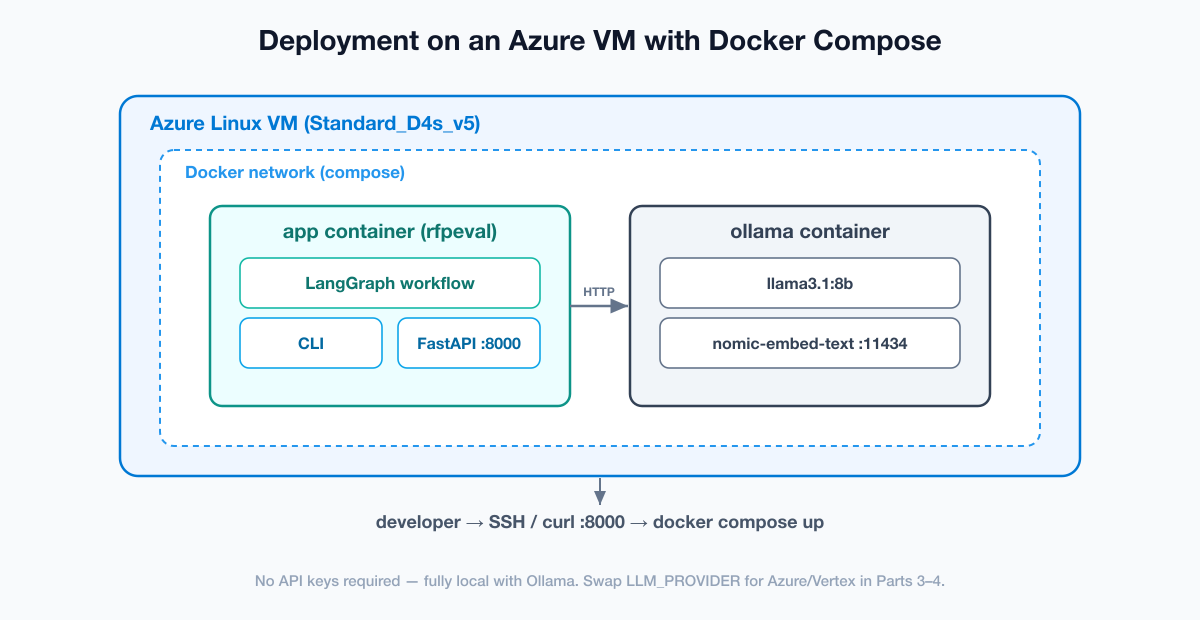
Step 1 — Provision the Azure VM
az group create --name rg-rfpeval --location eastus

az vm create
  --resource-group rg-rfpeval --name vm-rfpeval
  --image Ubuntu2204 --size Standard_D4s_v5
  --admin-username azureuser --generate-ssh-keys

az vm open-port --resource-group rg-rfpeval --name vm-rfpeval --port 8000
ssh azureuser@<public-ip>
A Standard_D4s_v5 (4 vCPU, 16 GB) is plenty for the CPU-only skeleton with a small Ollama model. We size up to a GPU VM in Part 5. Install Docker:

curl -fsSL https://get.docker.com | sh
sudo usermod -aG docker $USER && newgrp docker
Step 2 — The configuration layer
The whole system is steered by one environment variable. rfpeval/config.py loads typed config via pydantic-settings:
class LLMProvider(str, Enum):
    AZURE = "azure"
    VERTEX = "vertex"
    OLLAMA = "ollama"

class Settings(BaseSettings):
    model_config = SettingsConfigDict(env_file=".env", extra="ignore")

    llm_provider: LLMProvider = LLMProvider.OLLAMA
    temperature: float = 0.0
    shortlist_threshold: int = 70   # fit score >= this -> shortlist
    reject_threshold: int = 40      # fit score <  this -> reject; between -> human
    checkpointer: str = "memory"    # memory | sqlite
    # ... provider-specific fields for azure / vertex / ollama ...
Step 3 — The provider factory (the heart of the design)
rfpeval/llm.py reads the provider and returns a LangChain BaseChatModel, importing each provider SDK lazily:
def get_chat_model(settings=None) -> BaseChatModel:
    settings = settings or get_settings()
    provider = settings.llm_provider

    if provider == LLMProvider.AZURE:
        from langchain_openai import AzureChatOpenAI
        return AzureChatOpenAI(azure_endpoint=..., azure_deployment=..., ...)

    if provider == LLMProvider.VERTEX:
        from langchain_google_vertexai import ChatVertexAI
        return ChatVertexAI(model=settings.vertex_chat_model, project=..., ...)

    if provider == LLMProvider.OLLAMA:
        from langchain_ollama import ChatOllama
        return ChatOllama(model=settings.ollama_chat_model, base_url=...)

    raise ValueError(f"Unsupported LLM provider: {provider!r}")
rfpeval/embeddings.py mirrors this for retrieval. Because every node calls these factories, swapping models is a config change, never a code change.
Step 4 — Structured outputs and the graph state
To get the same validated JSON from every provider, we use pydantic schemas with model.with_structured_output(Schema). The key one is the per-requirement assessment:
class RequirementAssessment(BaseModel):
    requirement_id: str          # e.g. RFP-SEC-01
    requirement: str
    status: Literal["met", "partially_met", "not_met"]
    rationale: str
    evidence: str = ""
Note the LLM does not set the weight — that comes from the RFP definition. The graph state is a TypedDict threaded through every node; we store assessments as plain dicts so the state serializes cleanly through any checkpointer.
Step 5 — Wiring the graph
builder = StateGraph(EvaluationState)
for name, fn in [
    ("load_proposal", load_proposal), ("summarize_proposal", summarize_proposal),
    ("extract_highlights", extract_highlights), ("retrieve_requirements", retrieve_requirements),
    ("evaluate_proposal", evaluate_proposal), ("score_fit", score_fit),
    ("human_review", human_review), ("generate_report", generate_report),
]:
    builder.add_node(name, fn)

builder.add_edge(START, "load_proposal")
# ... linear edges ...
builder.add_conditional_edges(
    "score_fit", route_after_scoring,
    {"human_review": "human_review", "generate_report": "generate_report"},
)
builder.add_edge("human_review", "generate_report")
builder.add_edge("generate_report", END)

return builder.compile(checkpointer=get_checkpointer())
The route_after_scoring function returns "human_review" when the score is borderline, otherwise "generate_report". The checkpointer (MemorySaver in dev, SqliteSaver in prod) is what makes pause/resume possible.
Step 6 — Deterministic weighted scoring
The LLM provides qualitative judgments; a plain function turns them into a weighted score. This is what makes the result auditable and fair across bidders:
STATUS_FRACTION = {"met": 1.0, "partially_met": 0.5, "not_met": 0.0}

def compute_fit_score(assessments, weights) -> int:
    total_w = earned = 0.0
    for a in assessments:
        w = float(weights.get(a.get("requirement_id"), 1.0))
        total_w += w
        earned += w * STATUS_FRACTION.get(a.get("status", "not_met"), 0.0)
    return 0 if total_w == 0 else round(100 * earned / total_w)
Same assessments and weights in, same score out — every time.
Step 7 — The human-in-the-loop shortlist gate
from langgraph.types import interrupt

def human_review(state) -> dict:
    decision = interrupt({
        "vendor": state.get("vendor"),
        "fit_score": state.get("fit_score"),
        "assessments": state.get("assessments", []),
        "instructions": "Respond with {'decision': 'shortlist|reject|revise', 'notes': '...'}",
    })
    return {"human_decision": decision.get("decision", "shortlist"),
            "human_notes": decision.get("notes", "")}
The caller resumes with graph.invoke(Command(resume={...}), config) — possibly hours later — and the graph continues exactly where it paused.
Step 8 — Run it with Docker (recommended)
git clone <the companion repo> && cd tutorial-genai-rfp-evaluator

docker compose up -d --build
docker compose exec ollama ollama pull llama3.1:8b
docker compose exec ollama ollama pull nomic-embed-text

docker compose exec app python -m rfpeval.cli evaluate samples/sample_proposal.md --rfp sample_rfp
You will see the pipeline run end to end and print a cited recommendation. The FastAPI server is live at http://<vm-ip>:8000/health.
Prefer a virtualenv?
python3.12 -m venv .venv && source .venv/bin/activate
pip install -r requirements.txt
cp .env.example .env            # LLM_PROVIDER=ollama by default
python -m rfpeval.cli evaluate samples/sample_proposal.md --rfp sample_rfp
Testing: prove it works offline
pip install -r requirements.txt
ruff check .
pytest -q          # config switching, deterministic scoring, full graph + the human gate
Checkpointer choice: memory vs SQLite vs Postgres
| Checkpointer | Use when | Survives restart? | Multi-instance? |
|---|---|---|---|
MemorySaver |
Dev, tests, single run | No | No |
SqliteSaver |
Single-server production | Yes | No |
PostgresSaver |
Horizontally scaled API | Yes | Yes |
Troubleshooting & common errors
| Symptom | Cause | Fix |
|---|---|---|
Connection refused to Ollama |
App can’t reach the Ollama service | Use OLLAMA_BASE_URL=http://ollama:11434 inside Compose (service name, not localhost) |
model "llama3.1:8b" not found |
Model not pulled yet | docker compose exec ollama ollama pull llama3.1:8b |
| Graph never resumes after the human gate | No checkpointer, or different thread_id |
Compile with a checkpointer and reuse the same thread_id |
ModuleNotFoundError: langgraph |
System Python is 3.9 | Use Python 3.10+ (the Docker image is 3.12) |
| Empty/invalid structured output on a small model | Tiny models struggle with schemas | Use an instruction-tuned model (llama3.1:8b+) or a cloud provider (Parts 3–4) |
| Port 8000 unreachable on the VM | NSG blocks the port | az vm open-port ... --port 8000 and bind uvicorn to 0.0.0.0 |
What’s next
The skeleton runs, fully agnostic, on free local models. In Part 3 we flip LLM_PROVIDER=azure and wire up Azure OpenAI end to end — resource creation, model deployments, authentication, and the Azure-specific errors you will hit — without touching the graph you just built.
Frequently asked questions
Do I need an Azure VM to follow along?
No — it runs anywhere Docker runs, including your laptop. We use an Azure VM because the series later deploys a GPU VM, and developing on the same platform keeps things consistent.
Why default to Ollama in the skeleton?
It is free and local, so you can build and test the entire pipeline with zero API cost before adding a paid provider in Parts 3–4.
How does switching providers not break the graph?
Every model and embedding call goes through a factory keyed on LLM_PROVIDER. Nodes depend only on LangChain’s abstract interfaces, so changing the provider is a one-line .env edit.
Conclusion
We built the whole LLM-agnostic skeleton: typed config, provider factories, structured-output schemas, a checkpointed LangGraph with a human shortlist gate, deterministic weighted scoring, and a one-command Docker run on an Azure VM. The architecture is proven end to end on free local models — and ready to accept any provider. Continue to Part 3: Azure OpenAI.
Independent educational project; not affiliated with any employer; not procurement or legal advice.
