Author: MUASIF80

  • Zero-Downtime Deployment Checklist: A Guide for Founders

    Introduction

    As a founder, deploying updates without interrupting your user experience is critical. Downtime can lead to lost revenue, frustrated customers, and damaged reputation. Zero-downtime deployment ensures your application stays live and responsive during updates. This checklist will guide you through the essential steps to achieve seamless deployments.

    What Is Zero-Downtime Deployment?

    Zero-downtime deployment is a process where you release new code or updates without any interruption to your service. Users continue accessing your product without noticing any disruption, ensuring business continuity and maintaining trust.

    Why Founders Should Prioritize Zero-Downtime Deployment

    • Customer Experience: Avoid frustrating your users with service interruptions.
    • Revenue Protection: No downtime means no lost sales opportunities.
    • Brand Reputation: Reliable service builds trust and credibility.
    • Team Efficiency: Reduces pressure on your engineering team to fix outages quickly.

    Zero-Downtime Deployment Checklist

    1. Prepare Your Infrastructure

    • Use load balancers to distribute traffic across multiple servers.
    • Ensure your environment supports rolling updates or blue-green deployments.
    • Implement health checks to automatically remove unhealthy instances.

    2. Automate Your Deployments

    • Utilize CI/CD pipelines to automate testing and deployment.
    • Automate rollback procedures to quickly revert faulty releases.
    • Use deployment scripts to standardize processes and reduce human error.

    3. Implement Database Migration Strategies

    • Use backward-compatible database changes to avoid breaking existing code.
    • Apply migrations in small, incremental steps.
    • Test migrations thoroughly in staging before production deployment.

    4. Monitor and Test Continuously

    • Set up real-time monitoring for application performance and errors.
    • Conduct canary releases to test changes with a small subset of users.
    • Use synthetic testing to simulate user interactions during deployment.

    5. Communicate with Your Team

    • Notify all stakeholders ahead of deployment windows.
    • Have an incident response plan ready if issues arise.
    • Keep clear documentation of deployment procedures and rollback plans.

    Common Zero-Downtime Deployment Strategies

    Blue-Green Deployment

    Maintain two identical production environments (blue and green). Deploy to the inactive one and switch traffic after successful testing, eliminating downtime.

    Rolling Deployment

    Update servers incrementally, replacing instances one by one to keep the system running continuously.

    Canary Deployment

    Release changes to a small subset of users first, monitor performance, then gradually roll out to the entire user base.

    FAQ

    Q: How do I know if my deployment strategy is truly zero-downtime?

    A: Monitor your application’s uptime and user experience closely during deployments. Automated health checks and synthetic tests help validate zero downtime.

    Q: What tools can help automate zero-downtime deployments?

    A: Tools like Jenkins, GitLab CI/CD, Spinnaker, and Kubernetes support automated and zero-downtime deployment strategies.

    Q: Is zero-downtime deployment always necessary?

    A: For customer-facing applications where uptime matters, zero-downtime is essential. However, internal tools or less critical systems may tolerate brief downtime.

    Conclusion

    Zero-downtime deployment is vital for maintaining a seamless user experience and protecting your startup’s growth. By following this checklist, founders can reduce risks, streamline releases, and keep their products running smoothly. Prioritize automation, prepare your infrastructure, and always monitor your deployments to stay ahead of potential issues.
  • A .htaccess file for Apache httpd for Angular and Laravel

    Options Indexes FollowSymLinks
    AllowOverride All
    Require all granted
    
    # Ensure the default index file is the Angular app's index.html
    # DirectoryIndex fe/dist/frontend/browser/index.html
    
    <IfModule mod_rewrite.c>
        RewriteEngine On
    
        # Ensure the root URL (/) serves index.html
        RewriteCond %{HTTP_HOST} ^demo\.domain\.com$ [NC]
        RewriteCond %{REQUEST_URI} ^/$
        RewriteRule ^$ /fe/dist/frontend/browser/index.html [L]
    
        # Frontend SPA Routing (demo.domain.com) - Serve index.html for non-static files
        #RewriteCond %{HTTP_HOST} ^demo\.domain\.com$ [NC]
        # Exclude Angular static assets from being rewritten
        #RewriteCond %{REQUEST_URI} ^/.*\.(?:js|css|png|jpg|jpeg|gif|ico|svg|woff|woff2|ttf|eot|json|txt|map)$ [NC]
        #RewriteRule .* - [L]
    
        # Exclude Angular static assets from being rewritten
        RewriteCond %{REQUEST_URI} \.(js|css|png|jpg|jpeg|gif|ico|svg|woff|woff2|ttf|eot|json|txt|map)$ [NC]
        RewriteRule ^fe/dist/frontend/browser/(.*)$ fe/dist/frontend/browser/$1 [L]
    
        # Ensure static files are served correctly
        RewriteCond %{REQUEST_URI} \.(js|css|png|jpg|jpeg|gif|ico|svg|woff|woff2|ttf|eot|json|txt|map)$ [NC]
        RewriteCond %{DOCUMENT_ROOT}/fe/dist/frontend/browser/$1 -f
        RewriteRule ^(.*)$ /fe/dist/frontend/browser/$1 [L]
    
        # Frontend SPA Routing (demo.domain.com) - Serve index.html for non-static files
        RewriteCond %{HTTP_HOST} ^demo\.domain\.com$ [NC]
        RewriteCond %{REQUEST_FILENAME} !-f
        RewriteCond %{REQUEST_FILENAME} !-d
        RewriteRule ^(.*)$ /fe/dist/frontend/browser/index.html [L]
    
        # Laravel API Routing (demo-api.domain.com)
        RewriteCond %{HTTP_HOST} ^demo-api\.domain\.com$ [NC]
        RewriteRule ^api/(.*)$ pipeline_be/public/index.php/$1 [L]
    </IfModule>

    Here the demo and demo-api are two sub domains of the domain.

  • CI/CD using Bitbucket Pipeline for Laravel Application

    We need a yaml configuration file

    Credentials for the deployment target

    We will take the latest code

    Copy it on the target machine

    Then we will run the composer and artisan commands to install plugins and clean cache.

    A typical pipeline will need the ssh binaries and credentials for the target machine

    Then it will use scp command to copy the code

    And ssh commands to run different commands remotely.

    I will share a typical pipeline script below.

    image: php:8.2  # Use the updated PHP version
    
    pipelines:
      branches:
        dev:
          - step:
              name: BUILD App
              caches:
                - composer
              script:
                # Install required packages and PHP extensions for Laravel
                - apt-get update && apt-get install -y zip git unzip libzip-dev libpng-dev libjpeg-dev libfreetype6-dev libsodium-dev
                
                # Zip the application files
                - zip -r app.zip ./*
    
              artifacts:
                - app.zip  # Save the zipped application files after the build
    
          - step:
              name: Deploy to Hostinger
              deployment: Test  # Define deployment environment (optional)
              script:
                # Install dependencies for deployment
                - apt-get update && apt-get install -y openssh-client git
    
                # NEW LINE: Delete all files except 'storage' and clear 'bootstrap/cache'
                - ssh -p [PORT] -o StrictHostKeyChecking=no [USER]@[HOST] "
                    cd /home/[DEPLOY_DIR_PATH]/ &&
                    rm -rf app bootstrap config database public resources routes tests vendor \
                          artisan composer.json composer.lock package.json package-lock.json phpunit.xml"
    
                # Copy the zipped files to Hostinger using scp
                - scp -v -P [PORT] -o StrictHostKeyChecking=no app.zip [USER]@[HOST]:/home/[DEPLOY_DIR_PATH]/
    
                # Log into Hostinger and unzip the files
                - ssh -v -p [PORT] -o StrictHostKeyChecking=no [USER]@[HOST] "source /home/[USER]/.profile && cd /home/[DEPLOY_DIR_PATH]/ && unzip -o app.zip && rm app.zip && cp ../.env ./ && chmod +x deploy.sh && ./deploy.sh"
    
                # Run migrations based on commit message
                - printenv
                - export BITBUCKET_COMMIT_MESSAGE=$(git log -1 --pretty=%B)
                - echo $BITBUCKET_COMMIT_MESSAGE
    
                - >
                  if [[ $BITBUCKET_COMMIT_MESSAGE =~ ([A-Z_]+)=([^ ]+) ]]; then
                    KEY="${BASH_REMATCH[1]}"
                    VALUE="${BASH_REMATCH[2]}"
                    echo "Extracted key $KEY"
                    echo "Extracted value $VALUE"
    
                    ENV_VAR_NAME="DB_OP_$VALUE"
    
                    DB_CMD=${!ENV_VAR_NAME}
                    echo "Command To Pass: $DB_CMD"
                    ssh -p [PORT] -o StrictHostKeyChecking=no [USER]@[HOST] "setsid nohup /home/[USER]/deploy.sh '$DB_CMD' >> deploy.log 2>&1 < /dev/null & exit 0"
                  else
                    echo "No key-value pair found in commit message."
                  fi

  • SCP – Secure Copy

    scp source destination

    scp -i .ssh/key ./test.txt ubuntu@ip:~/

    This will copy the file test.txt from the source machine where this scp command is being run to the destination machine at ip address. They key will be used from .ssh folder with the name of key file as key.

  • Generate SSH Key

    To generate an SSH key we need open SSH installed on our machine.

    Let’s say we are working on a Ubuntu or Mac machine and we have open-ssh available. We can use

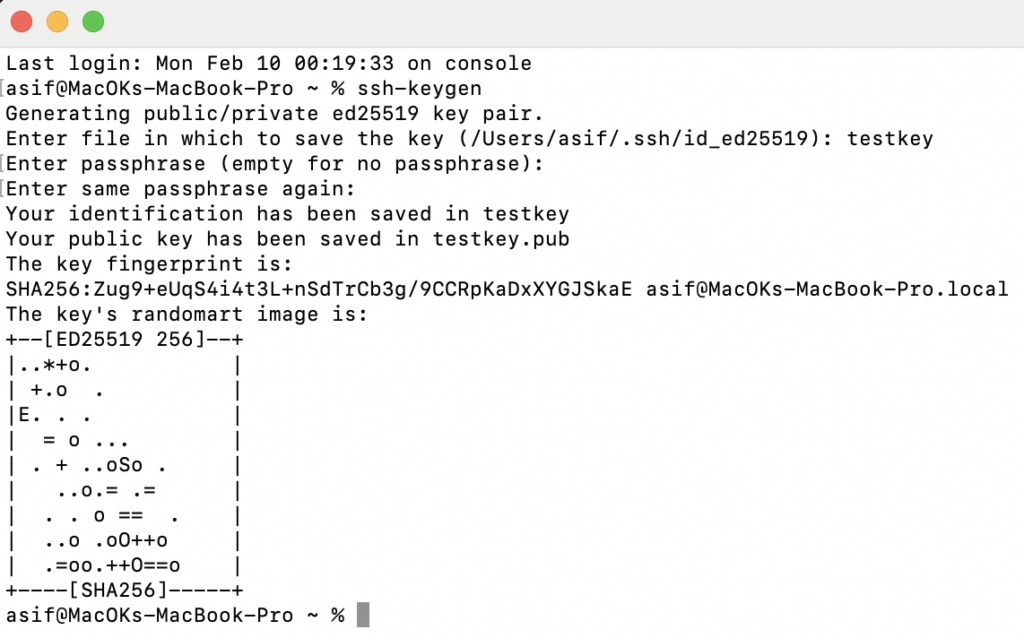
    ssh-keygen

    The key generation on mac

    It will prompt you for the key name. Enter the key’s name and hit enter. It will then prompt you for a passphrase but it’s optional. Let’s skip it for now.

    You will get the two files one for private key without any file extension and the other for public key with .pub file extension.

    Its quite simple to generate an ssh key.

    Next, we will see how we can configure this key to fetch code from bitbucket.